Blender UI and Runtime (BUI) 项目发布:速度远超 GPUI 的跨语言独立 UI 库
Blender's UI and Runtime: Much Faster Than GPUI
开源项目 BUI 将 Blender 的用户界面和运行时解耦并转化为独立的跨语言 UI 库,支持 Python、Rust、JavaScript、C 和 C++ 等多种语言及框架。该项目采用带有小 C 核心的高效运行时,支持 CPU 软件渲染与 GPU 渲染,提供类似 Blender 的组件与交互体验。
译文尚不完整,完整内容请切换到原文。
Blender 的用户界面,作为一个可从 Python、Rust、JavaScript/React、C、C++ 和 Dear ImGui 调用的库。
人们花了几十年时间构建和优化 Blender 的 GUI。它节能、省内存,而且速度超级快。我们将它解耦,让每个人都有机会用它构建自己的产品。它支持多种语言和框架,让你得心应手!
网站与完整文档:bui.preetham.top
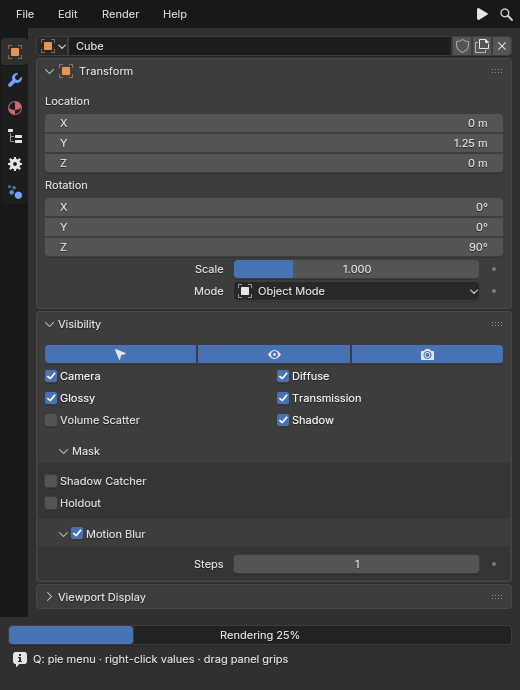
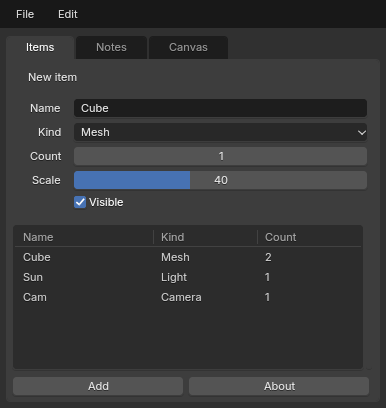
本 README 就像一本小册子。从头到尾阅读以了解完整内容,或者跳转到你需要的章节。当有更多内容要说时,每个章节都会链接到 docs/ 或 网站 上的更详细指南。
目录
- 安装
- 第一个应用:tkinter
- 第一个应用:Blender 组件
- 第一个应用:Qt 语法
- 第一个应用:Rust(采用 rsx 和 gpui 构建器)
- 第一个应用:JavaScript 和 React
- 第一个应用:Dear ImGui
- 第一个应用:C
- 工作原理
- Blender 的控件与交互
- 三种外观:HTML、带样式的和 Blender 组件
- CPU 与 GPU 渲染
- 脏渲染 (Damage rendering)
- 窗口宿主
- 文本与字体
- 主题:深色与浅色
第一部分:欢迎
1. 什么是 BUI
BUI 采用了 Blender 的用户界面(其控件绘制、交互规则和外观),并将其转化为一个拥有小型 C 核心的独立 UI 库。你的代码负责构建控件树并处理回调。布局、输入、绘制和呈现均通过快速的原生代码在 CPU 或 GPU 上进行。
BUI 的核心是 kit:一个用 C 语言编写的小型运行时。kit 将所有控件保存在一棵树中,对它们进行布局,处理鼠标和键盘事件,并按照 Blender 的方式绘制它们。绘制代码是 Blender 自身控件代码的 C 语言移植版本,交互则遵循 Blender 的规则。在 kit 之上是 bindings(绑定):它们是轻量级层,允许 Python、Rust、JavaScript、C++ 和 Dear ImGui 与其进行通信。
BUI 不是什么:
- 不是 Blender。它包含所需的 Blender UI 代码部分并独立构建。你不需要安装 Blender,也不需要懂 Blender 就能使用它。
- 不是浏览器。Rust 和 JavaScript 端使用 HTML 和 CSS 作为 UI 语言,但这里没有浏览器引擎、没有 webview,也没有网络。
- 不是重新构想。小部件绘制移植自 Blender 的
interface_widgets.cc,而对 Dear ImGui 的支持运行的是真正的 Dear ImGui。
2. 为什么会有 BUI
Blender 的界面以其手感而闻名。你按下一个数字输入框并拖动:光标消失,数值在你的手下平滑滑动,且永远不会触及屏幕边缘。你在输入框中输入 2*pi,它就能正常工作。你在菜单中输入 "ad cu",它就能找到 "Add Cube"。数百万艺术家双手都习惯了这些操作。
而且,这个界面既快速又节省资源。它只重绘发生变化的部分,在没有变化时休眠,并在毫秒级内启动。BUI 的存在是为了让任何语言编写的任何应用,都能同时拥有两者的优势:Blender 的手感和 Blender 的效率。
3. 适用人群
- 你有一个 tkinter 应用,希望它看起来不那么像 1998 年的产物。在 BUI 上运行它,无需修改。
- 你正在为艺术家构建工具,而他们已经熟悉 Blender。为他们提供双手期望的面版、滑块和快捷键。
- 你编写 Rust 或 React,想要一个原生桌面 UI,而无需打包浏览器。
- 你使用 Dear ImGui,希望它通过一个构建标志就能呈现出 Blender 的外观和手感。
- 你很好奇 UI 工具包是如何工作的。其源码清晰易读,概念也用通俗易懂的语言进行了阐述。
4. 多种接入方式
你可以通过多种方式驱动 BUI,它们都共享相同的 C 运行时,因此它们都拥有相同的小部件和交互:
| 你编写 | 你得到 | 状态 |
|---|---|---|
| tkinter 代码,甚至是现有程序,无需修改 | Blender 风格的应用;每个 tkinter 和 ttk API | 完整 |
Qt 风格的 Python(QWidget、布局、clicked.connect) |
Qt 小部件的共同子集 | 部分 |
Blender 组件(Panel、NumberSlider、PieMenu、节点编辑器……) |
45 个来自 Python 的原生 Blender 组件和编辑器;其中十个也支持来自 Rust 和 JavaScript | 完整 |
Rust:HTML + CSS + Tailwind、类 HTML 标记(rsx! / view!)、钩子(hooks),或 gpui / zopra 语法 |
一个类网页的框架:看起来像浏览器那样的 HTML、带有 styled 的 Blender 外观,以及 Blender 组件(<NumberSlider>、<Button>……) |
运行中 |
| 基于 Node.js 或 Bun 的 JavaScript / React:类 DOM 的 API 或 JSX | 通过 napi-rs 在原生窗口中运行相同的引擎和组件;由信号(signals)支持的 React 钩子 | 运行中 |
| 来自 C++、C、Python 或 Rust 的 Dear ImGui | 在 Blender 主题的 BUI 窗口上运行真正的 Dear ImGui,或者 ImGui 的小部件*就是* Blender 小部件的构建版本 | 运行中 |
C(BUI_kit.h) |
工具包本身:节点、小部件、窗口 | 运行中 |
| MyGo | MyGo | 尚未支持(即将推出) |
不知道该选哪个?如果你已有代码,请使用与之匹配的那一行。如果你准备用 Python 从头开始,Blender 组件是最友好的。
5. 特性一览
Blender 的小部件与交互
- 你可以通过带有隐藏的连续光标的拖动来操作数字输入框:按住 Shift 可进行精确调节,按住 Ctrl 可进行对齐。
- 数字输入框中的数学计算,带有 Blender 自己的表达式求值器:
2*pi、min(4, 3)、round(1.7)、x if c else y。 - Ctrl+滚轮可调整数值步长,Ctrl+C / Ctrl+V 可复制/粘贴数值,Backspace 可重置。
- 跨复选框拖动可将它们全部设置。
- 按住-拖动-释放菜单、饼图菜单和 Blender 的模糊菜单搜索:“ad cu”可找到“Add Cube”,容忍拼写错误,最近选择的项目排在最前面。
- 每次 UI 编辑时均支持 Ctrl+Z / Ctrl+Shift+Z,在输入时的文本框内也同样支持;可通过 Tab 键在字段之间切换。
- Blender 的浮动显示精度、多字段垂直拖动,以及随 Blender 动画折叠的面板。
- HSV 色彩圆盘、色阶、曲线、树状图、列表、文本区域、画布、节点编辑器以及 Blender 的文件浏览器。
- Blender 的深色和浅色主题,可在运行时切换。
Python,四种方式
- tkinter:tkinter 和 ttk 的全部 7,846 个公共名称。九个真实的程序在标准库和 BUI 上表现完全相同。
- Qt 语法:部件、布局、信号、
QPainter、菜单和定时器。 - 组件:45 个 Blender 部件、编辑器和模板。
- Dear ImGui:
from blenderui import imgui,pyimgui 风格。 - 一个
pip install,没有任何 Qt 或 Tk 部件在绘制。
Rust:原生网络平台
- 全部 113 个 HTML 元素,像浏览器一样进行绘制;
styled使任何子树都具有 Blender 的外观,而 Blender 组件(<NumberSlider>、<Button>、<ColorSwatch>……)则是真正的 Blender 部件。 - 现代 CSS:flexbox、带命名区域的网格、表格、
calc()和所有数学函数、var()、oklch()和color-mix()、:has()、嵌套、@layer、@media范围、@container、::before/::after、计数器。 - 效果与动态:
@keyframes动画和过渡、滤镜、backdrop-filter、混合模式、clip-path、遮罩、2D 变换、border-image。 - Tailwind CSS v4:
class="md:hover:bg-sky-500/50"或裸属性(<div p-4 bg-[#4772b3]>),带有 “您是指”编译错误。 - 类似 HTML 的标记
rsx!/view!、#[component],以及 zopra、React 或 Leptos 风格的钩子(use_state、signal、Memo、Effect、context)。 - 同样支持 gpui 兼容语法:
div().flex().gap_2()、Render、cx.listener。 - 在 crates.io 上:
cargo add blenderui。
生来迅捷
- 局部渲染(Damage rendering):闲置的 UI 消耗 0% 的 CPU,悬停时仅重绘其触及的部件。
- 可选的 GPU 渲染器(Windows 上为 Direct3D 11,Linux 上为 OpenGL 3.3),仿照 Blender 的实例化部件绘制。它绘制与 CPU 光栅相同的像素。
- 在基准测试中,每帧消耗的 CPU 比 gpui-fast 少 2–4 倍,内存占用更少,且首帧约为 5 毫秒。
- Blender 文本:Inter(Blender 的 UI 字体)已嵌入并使用 FreeType 按照 Blender 的方式进行渲染,因此文本在每个平台上看起来都一样。在 GPU 上,字形使用 Slug 从其轮廓绘制,并回退到类似于 Blender 的逐字形图集。
图像
- 每种语言一套解码器,用 C 语言编写:PNG、GIF、BMP、TGA、QOI(Wuffs,内存安全)、JPEG(libjpeg-turbo)、包含动画的 WebP(libwebp)、Radiance HDR、PNM 和 SVG。设计采用 Blender 的 imbuf:一种图像类型和一个格式表。
- 按其绘制的大小进行解码,在 UI 线程之外进行:JPEG 缩略图使用 DCT 缩放(4K 照片在约 12 毫秒内变成 256 像素缩略图),可见图像优先,滚动移开的请求被取消,且图像到达时仅重绘其矩形区域。页面绝不会跳动:尺寸来自文件头。
- 一个具有内存预算的缓存(默认 256 MiB)。滚动 1,000 张照片缩略图:p99 帧耗时 2.9 毫秒,内存 100 MB,而在 UI 线程上解码则为 96 毫秒和 2.5 GB;在稳定的帧中 0 次内存分配,每个块在退出时释放。图像。
- 动态 GIF 和 WebP 可以在任何显示图片的地方播放,按绘制的尺寸逐帧解码(每帧动画保留两帧),每帧有各自的延迟,且仅重绘图片的矩形区域。当移出屏幕、滚动走远或在隐藏窗口中时,它们会暂停:同时播放 200 个动画时,渲染帧耗时仅为 0.76 毫秒 p50 / 1.5 毫秒 p99,移出屏幕后则完全不消耗性能。
frame保留单帧;减少动态效果(reduced motion)则会保留所有帧。 - GPU 上的大图:超过 2047 像素的图片在 Direct3D 11 和 OpenGL 上会获得专属纹理(仅在超出设备限制时才会进行分块),并随图片释放。
<img>、CSSbackground-image、object-fit、BlenderImage组件、tkinterPhotoImage(现在还支持 JPEG、WebP、BMP、TGA、QOI、HDR、SVG)、画布图元、数据表格图片列、聊天列表媒体以及 Dear ImGui 纹理(也支持动态纹理)。
JavaScript 和 React
- React 19.3 可渲染至 BUI:HTML 宿主组件、CSS 与 Tailwind、事件、Suspense、过渡、动作以及 Blender 组件(
<NumberSlider>、<Button>等)。BUI 在 CPU 或 GPU 上绘制它们;这里没有浏览器,也没有 webview。 - React 的 Hook,采用 React 的名称,用于保存信号:将一个信号传给 JSX(
{count}),值的改变只会更新该节点而无需重新渲染;在渲染时读取它(count.value),组件则会像在 React 中一样重新渲染。有一套一致性测试套件会针对 React 原生的 Hook 对每个 Hook 进行检查。 @blender-ui/native:类似 DOM 的 API(createElement、appendChild、addEventListener),带有相同的信号,适用于没有 React 的应用。- Node.js 和 Bun,通过 napi-rs 插件提供支持,并带有用于测试的无头(headless)模式。
小型独立应用
bui build app.jsx可生成一个约 7 MB 的可执行文件:包含内嵌 QuickJS 引擎的 BUI。- 首帧在约 70 毫秒内渲染完成,内存占用为 19 MB,无需安装任何东西。这里没有浏览器,也没有 webview。
--bun则构建一个 Bun 可执行文件,包含 Node 的 API 和 JIT。- 构建过程只需不到一秒钟:应用的 bundle 会被附加到预构建的运行时中。
Dear ImGui
- 真正的 Dear ImGui 1.93:
imgui.h的每个功能都可以正常工作,包括ShowDemoWindow()。 - 四种语言:C++(直接引入
imgui.h)、C(cimgui.h,全部 399 个函数)、Python 和 Rust(由imgui.h生成)。 - Blender 的外观:采用 Inter 字体的 Blender 主题颜色和度量标准;或者通过
BUI_IMGUI_BLENDER_WIDGETS=ON使用 Blender 真实的控件和交互,其像素级效果与 BUI 自身完全一致。 - 闲置时零消耗:仅在接收到输入以及播放动画时才会运行帧。
原生支持所有平台
- Windows(Win32)和 Linux(X11、通过 XWayland 的 Wayland)上的原生窗口,以及从 Blender 的 GHOST 移植而来的用于 macOS 的实验性 Cocoa 宿主。
- HiDPI:Windows 上的按显示器 DPI、Linux 上的
Xft.dpi、macOS 上的 Retina。 - 用于测试和截图的无头(headless)模式,带有能够精确步进动画的虚拟时钟。
- 在 Linux 上,libX11 和 libGL 是在运行时动态加载的,因此 BUI 可以在没有它们的服务器上导入。
6. 图库
这里的每一张截图都是一个在后台离屏渲染的真实 BUI 窗口。如果一张图片 同时提供深色和浅色版本,GitHub 会显示与你的 主题相匹配的那一个。
来自 Python 的节点编辑器(examples/site/geometry_nodes.py)
饼图菜单以及 Blender 的菜单搜索(在任意打开的菜单中输入即可)
颜色选择器和工具提示
Rust 中的 CSS 效果:滤镜、clip-path、变换、混合模式、backdrop-filter(site_effects.rs)
带有 repeat(auto-fill, minmax())、跨度(spans)和 grid-auto-flow: dense 的 CSS 网格(site_grid.rs)
CSS @keyframes 在 0.25 s、0.6 s 和 1.0 s 时(site_animation.rs)
更多截图
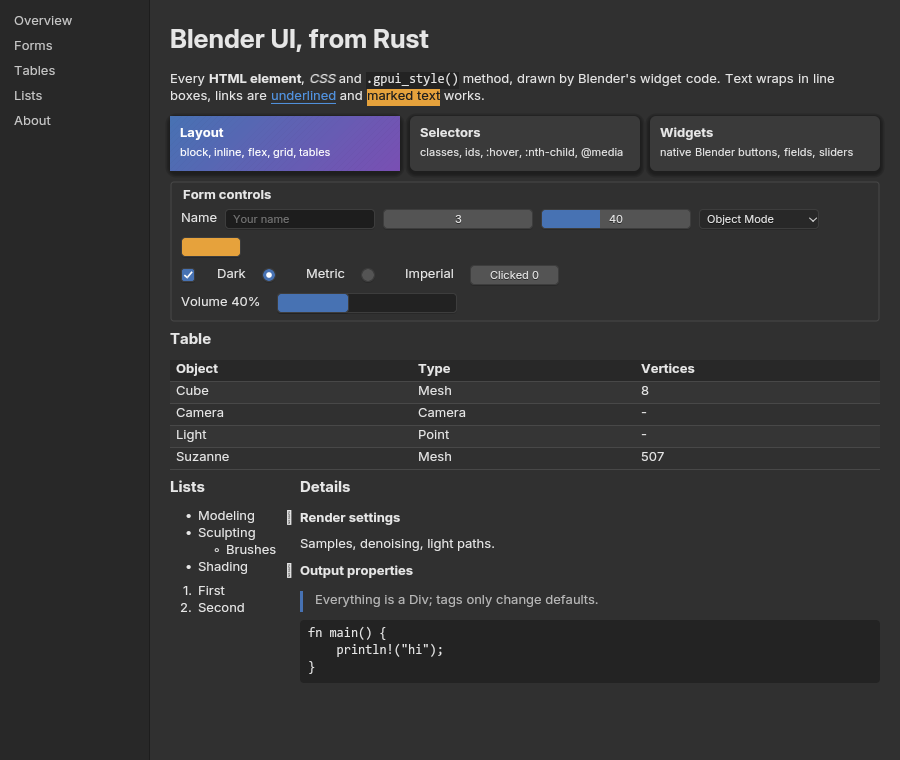
examples/showcase.rs:Rust 中的 HTML + CSS
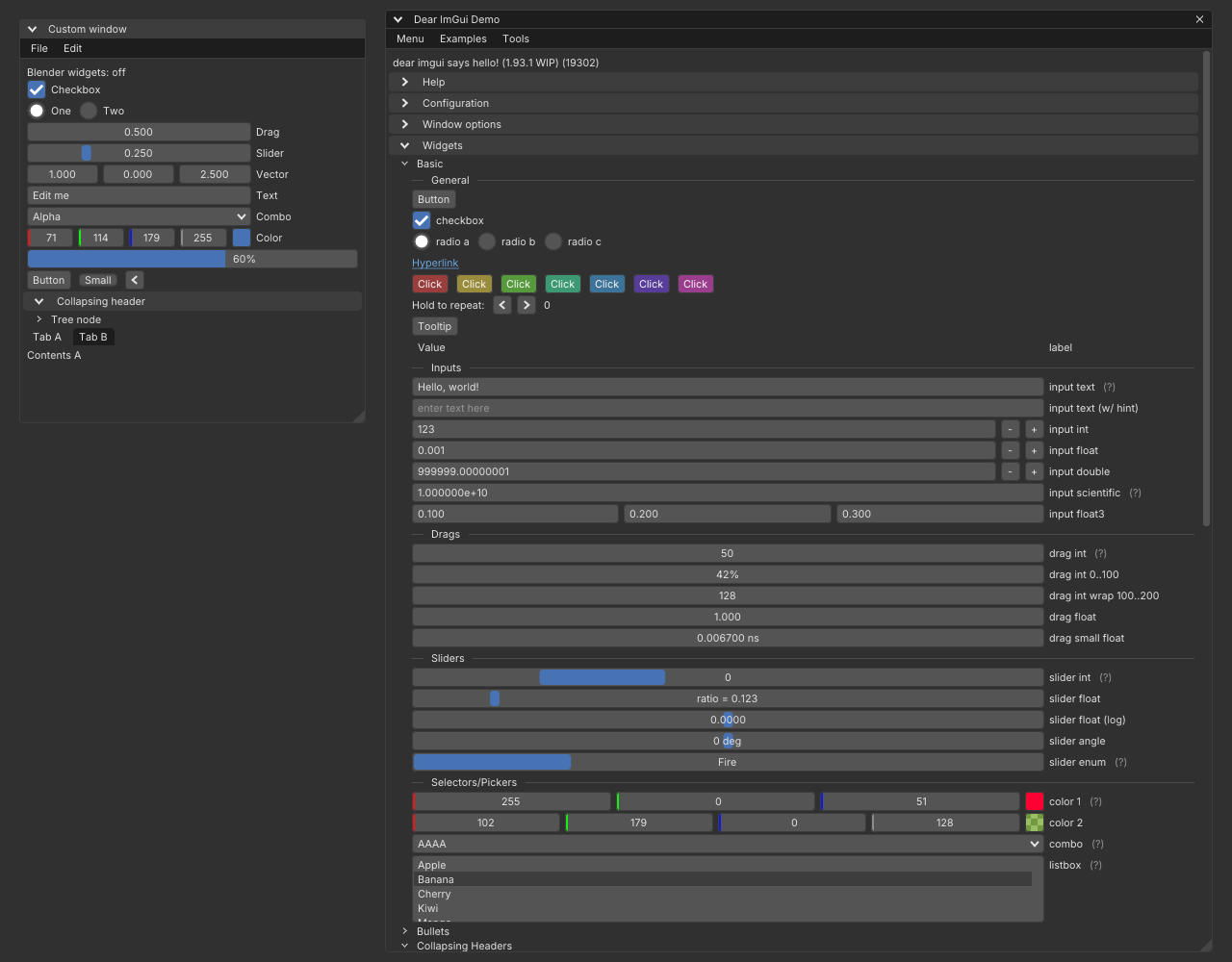
Dear ImGui 示例及其自带组件,采用 Blender 主题
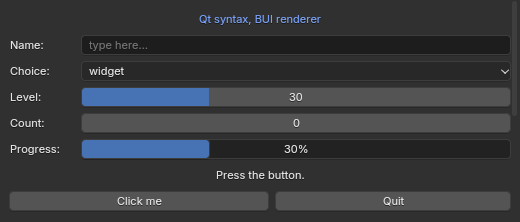
Qt 语法
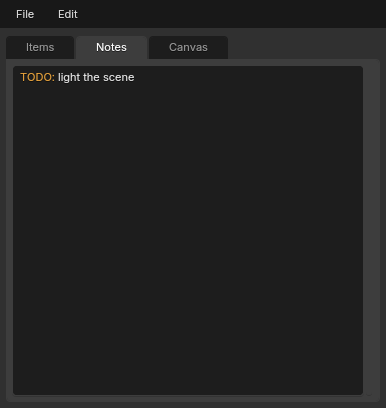
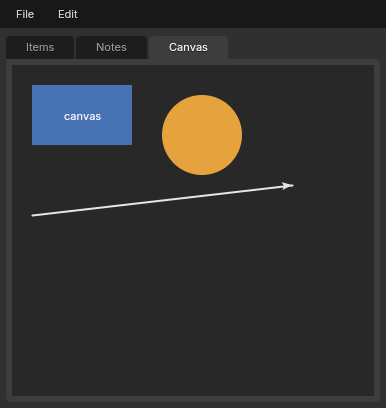
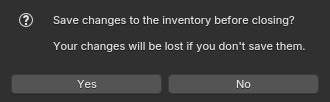
tkinter 程序:带标签的文本、画布、对话框
第二部分:快速入门
7. 安装
Python. 你需要 CPython 3.11 或更新版本。官方发布了适用于 Windows、Linux 和 macOS 的 Wheel 包,因此无需编译。一个包即可为你提供所有四个 Python API(tkinter 语法、Qt 语法、Blender 组件和 Dear ImGui):
pip install blenderui
python -c "import blenderui; print(blenderui.__version__)"
将其导入为 blenderui。你还会在较旧的示例中看到 import bui:它是原名称下的相同代码,但 PyPI 上的 bui 归属于一个无关的项目,因此请在你发布的任何内容中优先使用 blenderui。
Rust. 该 crate 为 crates.io 上的 blenderui:
cargo add blenderui
首次构建会为你编译 BUI 的 C 工具包,因此你需要 Rust 1.88 或更新版本、CMake 和 C 编译器(在 Windows 上,默认 MSVC 目标需要 Visual Studio Build Tools),在 Linux 上需要 X11 头文件(libx11-dev 或 libX11-devel;不需要 GL 头文件)。
JavaScript. 你需要 Node.js 18 或更新版本,或者 Bun:
npm install @blender-ui/react react     # or: bun add @blender-ui/react react
npm install @blender-ui/native          # the DOM-like API, without React
npm 包是针对 Windows x64 预编译的。在 Linux 上,请通过克隆仓库构建插件(在 bindings/ 中先执行 npm install 然后执行 npm run build,需要 Rust、CMake 和 C 编译器);那里的窗口是原生的 X11 窗口。在 macOS 上,JavaScript 目前以无头模式运行(参见 平台)。
C 和 C++. 使用 CMake 3.20+ 和 C11 / C++20 编译器(MSVC、GCC、MinGW-w64 或 Clang)从源码构建;在 Linux 上还需要 X11 头文件:
git clone https://github.com/ppmpreetham/BUI && cd BUI
cmake -S . -B build
cmake --build build -j 2
ctest --test-dir build            # optional: run the test suites
在你自己的 CMake 项目中,将 BUI 添加为子目录并链接 bui::kit(或链接 Dear ImGui 的 bui::imgui):
add_subdirectory(BUI)
target_link_libraries(myapp PRIVATE bui::kit)
Dear ImGui. Python 通过 pip install blenderui(import blenderui.imgui)获取。C++ 链接 bui::imgui,C 链接 bui_cimgui。Rust 使用 blenderui-imgui crate:
cargo add blenderui-imgui
如果出现问题:
| 现象 | 解决方法 |
|---|---|
ImportError: buipy |
你正在从源码检出目录中运行且未进行构建。请先构建(cmake --build build),或者设置 BUIPY_BUILD_DIR。扩展必须与你的 Python 版本匹配。 |
| 窗口从未出现 | 启动事件循环:mainloop()、app.exec() 或 App.run()。 |
| UI 模糊或过小 | 设置 BUI_UI_SCALE,例如 BUI_UI_SCALE=1.25。 |
gpu=True 没有反应 |
使用 BUI_GPU_DEBUG=1 运行以查看 GPU 设备未启动的原因。如果没有 Direct3D 11 或 OpenGL 3.3,BUI 将停留在 CPU 渲染器上,它会绘制相同的像素。 |
更多信息:docs/getting-started.md 以及网站上的 安装 BUI。
8. 第一个应用:tkinter
在 BUI 上运行任何 tkinter 程序,一行代码都不用改:
blenderui-tk my_app.py # same as: python -m bui.tksyntax my_app.pyblenderui-tk 会让 import tkinter 在该次运行中返回 BUI 的实现。或者在代码中显式启用:
import blenderui.tksyntax as tk
from blenderui.tksyntax import ttk, messagebox

root = tk.Tk()
name = tk.StringVar(value="Cube")
ttk.Entry(root, textvariable=name).pack(fill="x", padx=8, pady=8)
ttk.Button(root, text="Greet",
           command=lambda: messagebox.showinfo("Hi", "Hello " + name.get())).pack()
root.mainloop()
未修改的 tkinter 和 ttk 程序(examples/site/tk_export.py、ttk_queue.py)
数字字段(Spinbox、Scale)支持像 Blender 那样的拖动调节,Ctrl+Z / Ctrl+Shift+Z 可用于撤销编辑,filedialog 打开 Blender 的文件浏览器。指南:docs/tkinter.md。
9. 第一个应用:Blender 组件
使用 Blender 自身的组件构建:
from blenderui.components import App, Panel, NumberSlider, VectorField, Checkbox, ColorSwatch, Button

App("Object", (420, 520),
    Panel("Transform",
          VectorField("Location", (0.0, 1.25, 0.0)),
          NumberSlider("Scale", 1.0, min=0, max=10, on_change=print)),
    Panel("Shading",
          Checkbox("Shadows", True),
          ColorSwatch("Color", (0.8, 0.3, 0.1, 1.0))),
    Button("Apply", on_click=lambda: print("apply")),
).run()
来自组件的渲染属性编辑器(examples/site/render_props.py)
共有 45 个组件:布局、数值、按钮、视图、菜单与饼图菜单、颜色选择器、渐变色条、曲线和节点编辑器、区域与模板。参考文档:docs/components.md。
10. 第一个应用:Qt 语法
编写 Qt 风格的 Python 代码。导入语句是与 PySide 或 PyQt 唯一的区别,且两者皆不需要:
import sys
from blenderui.qtsyntax import (QApplication, QWidget, QVBoxLayout, QFormLayout,
                                QLineEdit, QComboBox, QSlider, QProgressBar,
                                QPushButton, QLabel, Qt)

app = QApplication(sys.argv)
window = QWidget()
window.setWindowTitle("Export")
layout = QVBoxLayout(window)

form = QFormLayout()
kind = QComboBox()
kind.addItems(["glTF", "FBX", "OBJ"])
quality = QSlider(Qt.Horizontal)
quality.setRange(0, 100)
form.addRow("Format:", kind)
form.addRow("Quality:", quality)
layout.addLayout(form)

bar = QProgressBar()
quality.valueChanged.connect(bar.setValue)
layout.addWidget(bar)

status = QLabel("Ready.")
go = QPushButton("Export")
go.clicked.connect(lambda: status.setText("Exporting as " + kind.currentText()))
layout.addWidget(status)
layout.addWidget(go)

window.show()
sys.exit(app.exec())
Qt 语法(examples/site/qt_material.py)
Qt 语法是局部的(大约占主窗口类上 Qt 方法名的 24%);任何缺失的内容都会引发 AttributeError。指南:
docs/qt.md。
11. 第一个应用:Rust,使用 rsx 和 gpui builders
BUI 的 Rust crate 有两种第一类语法,它们绘制相同的窗口:
rsx!是宏内部类似 HTML 的标记,带有#[component]函数和用于状态的钩子。- gpui builders 是普通的方法链:
div().flex().gap_3().child(...)。 状态存在于你的视图结构体中,并由cx.listener更新。gpui 代码也会针对 BUI 进行编译。
在 rsx! 中(这是
bindings/rust/blenderui/examples/hello.rs;
在 bindings/rust 中用 cargo run --release --example hello 运行它):
use blenderui::prelude::*;

#[component]
fn counter(label: &str) {
    let (count, set_count) = use_state(0);
    rsx! {
        <div flex items-center gap-3 p-4 rounded-xl bg-zinc-800>
            <span text-zinc-300>{label.to_string()} ": " {count().to_string()}</span>
            <div px-3 py-1 rounded-md bg-sky-700 hover:bg-sky-500 onClick={move || set_count(count() + 1)}>
                "Add one"
            </div>
        </div>
    }
}

struct Hello;

impl Render for Hello {
    fn render(&mut self, _: &mut Window, _: &mut Context<Self>) -> impl IntoElement {
        rsx! {
            <body m-0 p-6 min-h-screen flex flex-col gap-4 bg-zinc-900 text-white>
                <h1 text-2xl font-bold>"Hello, BUI"</h1>
                <counter label="Clicks" />
                <NumberSlider min={0.0} max={10.0} value="5" />   // a real Blender slider
            </body>
        }
    }
}

fn main() {
    Application::new().run(|cx| {
        cx.open_window(WindowOptions::default(), |_, cx| cx.new(|_| Hello)).unwrap();
    });
}
在 gpui builders 中,相同的窗口:
use blenderui::prelude::*;

struct Hello { count: i32 }

impl Render for Hello {
    fn render(&mut self, _: &mut Window, cx: &mut Context<Self>) -> impl IntoElement {
        let counter = div().flex().items_center().gap_3().p_4().rounded_xl().bg(rgb(0x27272a))
            .child(span().text_color(rgb(0xd4d4d8)).child(format!("Clicks: {}", self.count)))
            .child(div().px_3().py_1().rounded_md().bg(rgb(0x0369a1))
                .hover(|s| s.bg(rgb(0x0ea5e9))).cursor_pointer()
                .child("Add one")
                .on_click(cx.listener(|this, _, _, cx| {
                    this.count += 1;
                    cx.notify();
                })));
        body().m_0().p_6().css("min-height", "100vh").flex().flex_col().gap_4()
            .bg(rgb(0x18181b)).text_color(white())
            .child(h1().text_2xl().font_bold().child("Hello, BUI"))
            .child(counter)
            .child(NumberSlider().min(0.0).max(10.0).value("5"))   // a real Blender slider
    }
}

fn main() {
    Application::new().run(|cx| {
        cx.open_window(WindowOptions::default(), |_, cx| cx.new(|_| Hello { count: 0 })).unwrap();
    });
}
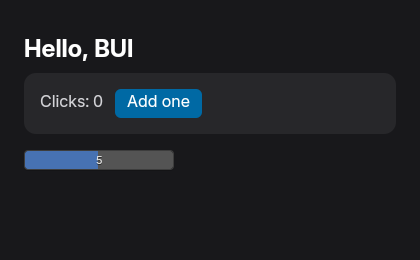
在 rsx! 中容易让人踩坑的两件小事:
- 文本子级是文本(
&'static str、String、SharedString)或元素。数字和借用的&str属性不是,所以请编写{count().to_string()}和{label.to_string()}。 - 组件的主体是以标记结尾的普通块,通常是一个
rsx!。
这是一个更大的例子,一个渲染农场仪表盘,分别用两种语法各写了一遍。 这两个程序绘制相同的像素:
site_dashboard.rs(rsx!)和 site_dashboard_builder.rs(gpui builders)
指南:docs/rust.md,以及网站上的 Rust 教程。
12. 第一个应用:JavaScript 和 React
/** @jsxImportSource @blender-ui/react */
import { render, useState, NumberSlider } from "@blender-ui/react"

function Counter() {
  const [count, setCount] = useState(0) // React's hook, holding a signal
  return (
    <main styled className="p-6 flex flex-col gap-3">
      {" "}
      {/* `styled`: Blender's look */}
      <span>Clicks: {count}</span>
      <button onClick={() => setCount((c) => c + 1)}>Add one</button>
      <NumberSlider min={0} max={10} /> {/* a Blender component */}
    </main>
  )
}

render(<Counter />, { title: "Counter", width: 360, height: 200, gpu: true })
bun app.jsx                    # run it (Bun reads JSX directly)
npx bui build app.jsx          # or ship it: app.exe, one 7 MB file
没有 React,@blender-ui/native 会为你提供一个类似于 DOM 的 API:
const { App, signal } = require("@blender-ui/native")

const app = new App({ gpu: true })
const win = app.window({ title: "Hello", width: 360, height: 200 })
win.body.className = "m-0 p-6 flex flex-col gap-3 bg-[#2b2b2b] text-[#e6e6e6]"

const clicks = signal(0)
const label = win.createElement("span")
label.textContent = clicks // follows the signal
const button = win.createElement("button")
button.textContent = "Add one"
button.addEventListener("click", () => clicks.value++)
win.body.appendChild(label)
win.body.appendChild(button)
React 中的任务列表(examples/site/js/todo_react.js);类似 DOM 的版本绘制出的内容是相同的
Node.js 18+ 或 Bun。预构建版本适用于 Windows x64;在 Linux 上,从源码构建插件(npm run build 在 bindings/node 中),窗口将是原生的。指南:
docs/javascript.md。
13. 第一个应用:Dear ImGui
真正的 Dear ImGui 1.93 运行在 BUI 上:BUI 的窗口、输入、CPU/GPU 渲染器、Blender 的主题以及 Inter 字体。现有的 ImGui 代码无需修改即可编译。
C++:
#include "imgui.h"
#include "imgui_impl_bui.h"     // see examples/imgui_demo.cpp

static void frame(void*) {
    ImGui::ShowDemoWindow();
    ImGui::Begin("Hello");
    static float v = 0.5f;
    ImGui::SliderFloat("Value", &v, 0.0f, 1.0f);
    ImGui::End();
}

int main() {
    ImGui::CreateContext();
    ImGui_ImplBUI_App* app = ImGui_ImplBUI_CreateApp("Demo", 1280, 800, frame, nullptr);
    ImGui_ImplBUI_RunApp(app);
    ImGui_ImplBUI_DestroyApp(app);
    ImGui::DestroyContext();
}
Python:
import blenderui.imgui as imgui        # C: cimgui.h  ·  Rust: the blenderui-imgui crate

state = {"value": 0.5}

def frame():
    imgui.show_demo_window()
    imgui.begin("Hello")
    _, state["value"] = imgui.slider_float("Value", state["value"], 0.0, 1.0)
    imgui.end()

imgui.run(frame, title="Hello", size=(1280, 800))
C(cimgui.h,cimgui 惯例:ImGui_Button、ImGui_ButtonEx 以及 cimgui_impl_bui.h 中的后端)和 Rust(blenderui-imgui)的工作方式相同:
use blenderui_imgui as imgui;

fn main() {
    let mut value = 0.5f32;
    imgui::run("Hello", [1280, 800], move || {
        imgui::show_demo_window();
        imgui::begin("Hello");
        imgui::slider_float("Value", &mut value, 0.0, 1.0);
        imgui::end();
    });
}
使用 -DBUI_IMGUI_BLENDER_WIDGETS=ON(或 Rust 特性 blender-widgets)构建,ImGui 的构件就会变成 Blender 自己的构件:DragFloat 是 Blender 的拖动微调数字字段(按 Shift 精确调整,按 Ctrl 吸附),SliderFloat 是 Blender 的数字滑块,复选框可通过拖动切换,菜单和组合框会变成 Blender 的菜单。ImGui API 的其余部分保持不变。(PyPI wheel 在构建时未包含此功能,因此从 Python 使用时,除非你从源码构建,否则在 Blender 主题中获得的是 ImGui 自己的构件。)
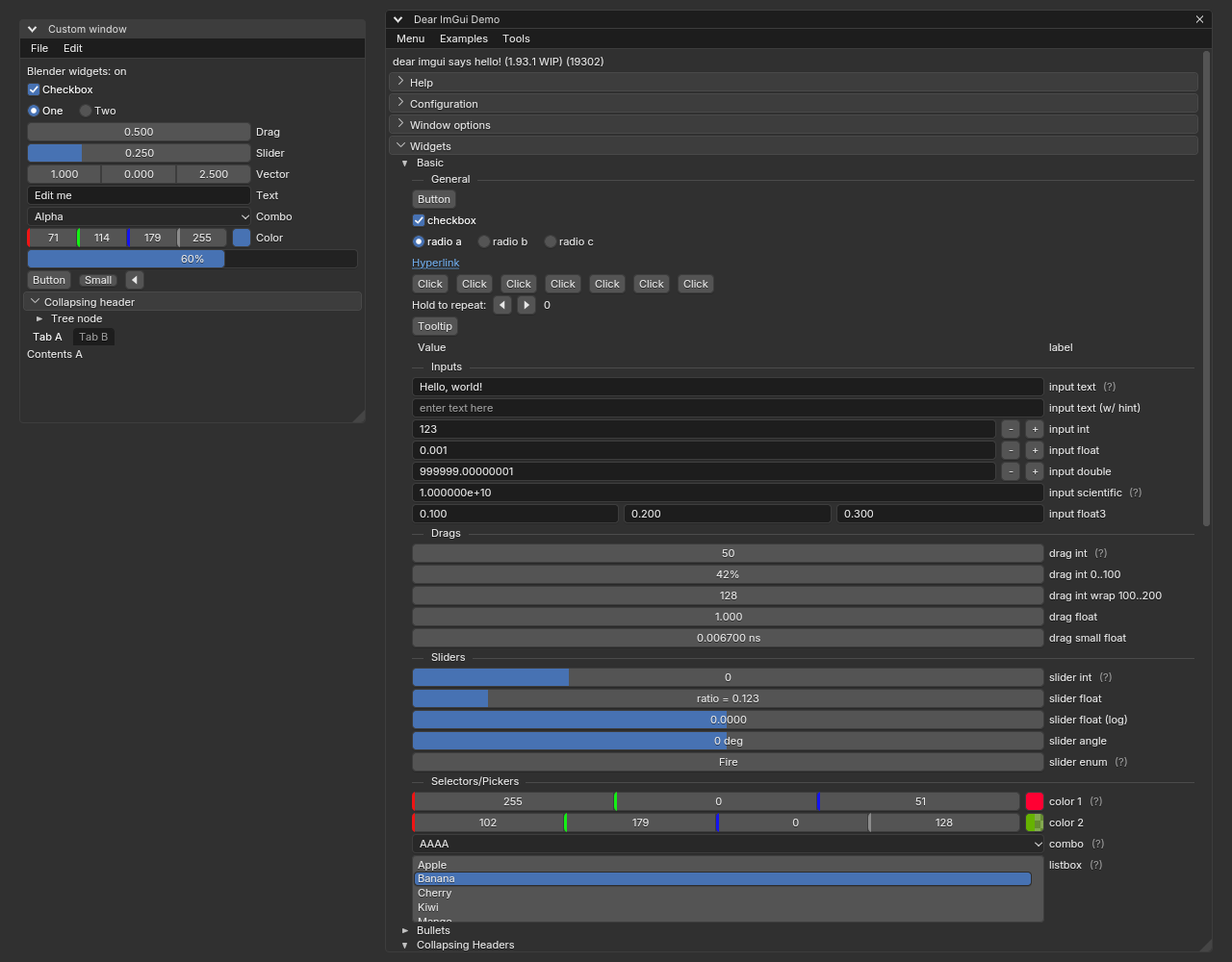
Dear ImGui 自己的演示,带有 BUI_IMGUI_BLENDER_WIDGETS=ON:数字字段、滑块、颜色行和面板标题均来自 Blender
相同的 ImGui 代码:ImGui 的构件(左)和 Blender 构件构建版本(右)(examples/site/imgui_inspector.cpp)
指南、覆盖率和原生外观:docs/imgui.md。
14. 第一个应用:C
该工具包的 API 只有一个头文件 kit/include/BUI_kit.h,它同时也是参考手册:每个函数都有一行注释。这是一个简短的 examples/kit_hello.c:原生窗口中的滑块和按钮。
#include <stdio.h>
#include "BUI_kit.h"

static void on_event(void *data, BKNode *node, int kind, void *ref, double a, double b)
{
  if (kind == BK_EV_CLICK) printf("clicked %s\n", BK_get_str(node, "text"));
  else if (kind == BK_EV_CHANGE) printf("%s = %g\n", BK_get_str(node, "label"), BK_get_num(node, "value"));
}

int main(void)
{
  BKNode *root = BK_node_new("frame");          /* everything is a node */
  BK_set_num(root, "padding", 8);               /* configured by property name */

  BKNode *size = BK_node_new("slider");
  BK_set_str(size, "label", "Size");
  BK_set_num(size, "max", 10);
  BK_set_num(size, "value", 2.5);
  BK_node_add(root, size, -1);
  BK_geom_set_manager(size, BK_GEOM_PACK);      /* Tk's packer, in C */
  BK_geom_set(size, "fill", 1);

  BKNode *apply = BK_node_new("button");
  BK_set_str(apply, "text", "Apply");
  BK_node_add(root, apply, -1);
  BK_geom_set_manager(apply, BK_GEOM_PACK);

  BKContext *ctx = BK_context_new(root);        /* input, focus, popups, undo */
  BKHost host = {0};
  host.emit = on_event;                         /* the window fills in the rest */
  BK_context_set_host(ctx, &host);

  if (BK_window_supported()) {                  /* Win32, X11 or Cocoa */
    BKWindow *win = BK_window_new(ctx, "BUI from C", 320, 120);
    BK_window_show(win);
    BK_window_run();
    BK_window_free(win);
  }
  BK_context_free(ctx);
  BK_node_free(root);
  return 0;
}
cmake -S . -B build -DBUI_BUILD_EXAMPLES=ON
cmake --build build --target bui_kit_hello
一个更大的 C 程序:修改器堆栈(examples/site/kit_modifiers.c)
如果没有窗口系统,则渲染到位图光栅中(BK_render(ctx, raster, w, h, full)),这也是测试和截图的工作方式。指南:docs/c-api.md。
第三部分:概念
15. 工作原理
 your code:   tkinter   Qt   components   Dear ImGui (C++/C/Python/Rust)   Rust: rsx! / HTML / CSS / Tailwind / hooks   JS / React
                  │      │        │                │                                  │                                    │
                  └──── Python: options, signals    │ ImGui core + BUI backend          └── style cascade + taffy layout ◄────┘
                                  │                │                                  │
 C kit (kit/):   node tree · geometry · input & interaction · Blender widget drawing · undo · animation · themes · Blender search/expr
                                         │
 renderer:       damage-driven software raster (parallel)   or   GPU (Direct3D 11 / OpenGL 3.3, instanced, opt-in)
                                         │
 window:         native Win32 / X11 / Cocoa window   ·   stdlib Tk window   ·   headless (tests, screenshots)
- 你的代码(使用上述任意语言)创建构件,并指定它们发生更改时的行为。
- 工具包将它们保持在同一个树结构中,进行布局并处理输入,遵循 Blender 的规则。
- 渲染器将它们绘制出来,默认在 CPU 上,如果需要也可以在 GPU 上。
- 差分渲染(Damage rendering)使其成本低廉:更改只会重新绘制它接触到的矩形,闲置的窗口完全不消耗 CPU。
底层原理:
- Blender 的真实 UI 代码。小部件绘制是 Blender
interface_widgets.cc的 C 语言移植版本(round_box_edges、widgetbase_draw、形状 表),交互遵循interface_handlers.cc。颜色数学、矩形、 文本光标、字符串搜索和表达式求值都是直接复制的 Blenderblenlib。一些界面文件(字符串搜索、文本编辑撤销、 浮点精度)被复制到kit/intern/blender/中并针对该 工具包进行了编辑。X11 和 Cocoa 主机遵循 Blender 的 GHOST;Win32 主机则由 BUI 自行实现。 - 一个节点树。每个小部件都是一个工具包节点。C 语言工具包负责布局、点击 测试、悬停、焦点、拖拽、菜单、工具提示、撤销和动画。
- 局部刷新渲染。更改只会标记其小部件的矩形,并且只有 发生变化的图块才会到达屏幕。
- 精简绑定。Python、Rust 和 JavaScript 仅保留其语法 层所需的内容。
更多信息:ARCHITECTURE.md 和 工作原理。
16. Blender 的小部件和交互
这些规则存在于 C 语言工具包中,因此它们在绘制 Blender
小部件的所有地方都以相同方式工作:Python 组件、tkinter 和 Qt 语法、Rust 和
JavaScript Blender 组件以及 styled 内部的表单控件、ImGui 的
Blender 小部件构建版本,以及每个 C 工具包小部件。
- 拖拽微调。按住数值字段并向侧面拖拽。光标会隐藏 并循环,因此你永远不会触及屏幕边缘,并在拖拽开始的 位置重新出现。浮点数每像素移动一个点击步长;按住 Shift 以十分之一的 速度移动;按 Esc 取消并恢复该值。
- Ctrl 吸附遵循 Blender 的规则:无界浮点数吸附到整数单位,角度 吸附到 10°,滑块根据其范围吸附到 0.1、1 或 10,整数吸附到 10 的倍数。
- 点击输入,并键入数学公式:Blender 的表达式求值器
(
expr_pylike_eval.cc)将2*pi、90/4、min(4, 3)或x if c else y转换为数字。这在 Blender 的数字字段和 滑块中有效;纯文本字段会将你键入的内容保留为文本。 - 任意数值的快捷键:Backspace 重置为默认值,
-取反, Ctrl+Wheel 步进,Ctrl+C / Ctrl+V 复制和粘贴,右键点击打开复制、 粘贴和重置。 - 同时修改多个字段。在数字字段列上向下拖拽以 选中它们,然后向侧面拖拽以同时更改它们。跨复选框 (或面板标题)拖拽可在一次操作中全部设置。
- 面板随 Blender 的动画折叠;Ctrl+点击打开一个并 关闭其他面板;拖拽把手可重新排序。
- 菜单支持按住-拖拽-释放或点击;悬停可切换菜单栏菜单; 饼菜单在指针周围打开。
- 菜单搜索即 Blender 的字符串搜索:在任何打开的菜单中直接开始键入。 它匹配词首字母(“ad cu”可找到“Add Cube”),包容拼写错误,并 将你最近的选择排在最前面。
- 随处撤销。Ctrl+Z 和 Ctrl+Shift+Z 适用于每个 UI 编辑操作,以及 键入时的文本框内部。连续输入或多字段拖拽算作 一步。
- 浮点精度遵循 Blender 的规则:小数值会显示它们 所需的小数位数。
- 工具提示在 Blender 的半秒延迟后出现。
即将推出:带单位的键入数值(“2 m”)、Blender 的即输即搜 弹出窗口,以及小部件拖拽。更多信息: Blender 的小部件。
17. 三种外观:HTML、样式化组件和 Blender 组件
在 Rust 和 JavaScript 中,你可以按元素选择外观:
| 你编写 | 你得到 |
|---|---|
纯 HTML:<button>、<input type="range">、<select> ... |
浏览器绘制的内容:白底黑字以及 Chrome 的表单控件,使用 Inter UI 字体 |
任意元素上的 styled:<div styled>、div().styled() |
Blender 的外观和内部一切:Blender 的主题(深色或浅色)、UI 字体、Blender 部件 |
Blender 组件(大写):<NumberSlider>、<Button> ... |
Blender 的部件和随处可见的交互(拖动以擦除、Ctrl+Z、Blender 的颜色选择器) |
这些组件包括 Button、Checkbox、Radio、NumberField、NumberSlider、
TextField、TextArea、ColorSwatch、Dropdown 和 ProgressBar。每一个
都是它所代表的 HTML 元素,因此每个属性、样式和事件都在它上面起作用:
rsx! {
    <main class="p-4 flex gap-2">                          // browser look
        <input type="range" />                             // Chrome's slider
        <NumberSlider min={0.0} max={10.0} value="2.5" />  // Blender's slider
        <div styled><button>"Apply"</button></div>         // Blender's look inside
    </main>
}
div().child(Checkbox().checked(true)).child(Button().child("Apply"))   // gpui syntax
import { render, NumberSlider, Button } from "@blender-ui/react"
// <NumberSlider min={0} max={10} onChange={...} />, <Button onClick={...}>Apply</Button>
// DOM API: win.createElement("NumberSlider")
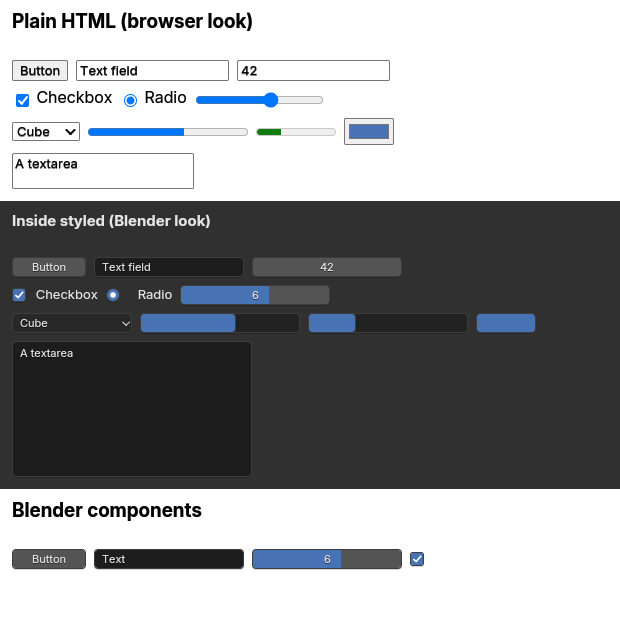
cargo run --example forms:纯 HTML,在 styled 内部,以及 Blender 组件
相同的标记,纯文本(左)和在 styled 内部(右)。纯 HTML 在两个主题中看起来都一样。
来自 Rust 的 Blender 组件(site_components.rs)
Python 的 Blender 组件(Panel、PieMenu、节点编辑器等)是一个独立且更大的集合。
18. 在 CPU 和 GPU 上渲染
BUI 有两个渲染器,它们绘制相同的像素。
- 软件光栅器(
gpu/intern/gpu_raster.c)是默认设置。它使用带符号距离覆盖的抗锯齿形状(就像 Blender 的部件着色器)绘制到一个帧缓冲区中,在 64×32 的图块中将其与最后一帧进行比较,并且只报告发生更改的图块。大型画布在 Windows 上以并行色带绘制(BUI_RASTER_THREADS)。它不需要显卡的任何支持,并且占用内存最少。 - GPU 渲染器是可选的:Windows 上的 Direct3D 11
(
gpu/intern/gpu_d3d11.c)和 Linux 上的 OpenGL 3.3 core (gpu/intern/gpu_gl.c)。它以 Blender 的实例化部件绘制为模型:每个图元是单个超级着色器的一个 128 字节实例,因此一帧就是几个实例化的绘制调用。文本和图像缓存在图集中。帧渲染到持久目标中,因此只有损坏的区域会重新绘制;在 Windows 上,flip 模式交换链呈现脏矩形。在 Linux 上,libGL、libEGL和libX11在运行时加载(用于窗口的 GLX,用于离屏的 EGL),因此不需要 GL 头文件,并且在缺少 OpenGL 的地方,BUI 会回退到 CPU。
着色器评估软件光栅器的公式:奇偶校验测试发现在两个后端上,172,800 个像素中有 10 个的差异超过 3/255。
开启 GPU:
| 位置 | 方式 |
|---|---|
| Python | 在创建窗口之前 bui.set_gpu(True);tkinter 语法也 tk.Tk(gpu=True) |
| Rust | Application::new().gpu(true) 或 WindowOptions { gpu: Some(true), .. } |
| JavaScript | new App({ gpu: true }) 或 React 的 render(..., { gpu: true }) |
| C | BUI_gpu_set_default(1) 或 BK_window_set_gpu(win, 1) |
| 任何应用,无需修改代码 | BUI_GPU=1 |
BUI_GPU=1 在代码中覆盖应用范围的设置;BUI_GPU=0 关闭应用范围的默认值,但请求 GPU 的窗口仍然会得到它。在无法启动设备的任何地方,BUI 会悄悄停留在 CPU 上(BUI_GPU_DEBUG=1 说明了原因)。
选哪一个? 工具窗口、表单或设置面板:CPU(对内存最轻量,空闲时为零)。大型或 HiDPI 窗口、大量动画、数千个项目:GPU(每帧的 CPU 占用大约减半或更少,多占用约 10 MB 内存外加 GPU 内存)。服务器和测试:CPU。macOS:暂时使用 CPU(那里的 GPU 渲染器即将推出)。
更多:渲染。
19. 损坏渲染
让 BUI 窗口保持打开并走开:它完全不消耗 CPU。将鼠标悬停在按钮上,BUI 会重新绘制该按钮,而不是整个窗口。
- 更改只会将为其部件的矩形标记为脏(弹出窗口为其阴影留出边距)。
- 脏矩形会合并(每个窗口最多 24 个)。
- 如果没有任何东西变脏,循环就不会渲染;它会休眠直到下一个输入或计时器。
- 只有损坏的区域会被重新绘制,并剪切到它们的矩形。
- 光栅器在 64×32 的图块中将新像素与最后一帧进行比较;未做任何更改的重绘不报告任何内容。
- 只有受损的图块才会到达屏幕(Win32 会复制它们,X11 会用
XPutImage发送每个矩形,Cocoa 会使其失效,GPU 则会呈现脏矩形)。
在完整组件演示中,完整帧的大约耗费 0.7 ms,悬停或数字微调(number-scrub)帧大约耗费 0.05 ms。动画仅在有内容移动时运行,并与显示器同步。更多信息:Damage rendering。
20. 窗口宿主
窗口宿主将套件上下文放入顶层窗口中并为其提供输入。
| 宿主 | 平台 | 注意 |
|---|---|---|
Win32 (kit_window_win32.c) |
Windows | BUI 自己的宿主。支持每监视器 DPI、垂直同步(vsync)同步动画、剪贴板、光标以及窗口管理器功能。 |
X11 (kit_window_x11.c) |
Linux;通过 XWayland 支持 Wayland | 在 Blender 的 GHOST 之后进行输入映射。Xft.dpi 缩放。libX11 在第一个窗口打开时加载。 |
Cocoa (kit_window_cocoa.m) |
macOS | 实验性。移植自 Blender 的 GHOST Cocoa 代码,支持 Retina 缩放。它已通过 CI 检查,目前已在一台 Apple Silicon Mac 上进行过手动测试;测试说明见 docs/macos-testing.md。 |
| Tk | Python,任何平台 | 一个标准的 tkinter 窗口,用于显示套件的帧缓冲区。BUI_HOST=tk 会强制启用它;当没有原生宿主可用时,它也是后备方案。 |
| Headless | 任何平台 | 无窗口:渲染到位图(raster)中用于测试和截图,使用虚拟时钟精确推进动画。 |
BUI_UI_SCALE=1.5 固定 UI 缩放而不跟随显示器(1 是 Blender 的默认值,20 像素小部件)。更多信息:Window hosts。
21. 文本与字体
你的应用的文本在 Windows、Linux 和 macOS 上看起来是一样的,并且看起来像 Blender 的:
- Inter(Blender 的 UI 字体)已内嵌(可变版本,带有光学大小和字重轴)。UI 文本在缩放 1 时为 11 pt。
- 渲染效果类似 Blender 的 BLF:BUI 内置了 FreeType 2.13.3,并使用轻量微调(light hinting)、Blender 的 gamma-1.43 覆盖表、Inter 的光学大小、真正的粗体实例、无字偶距(与 Blender 相同)以及 Blender 的文本阴影进行渲染。使用
BUI_TEXT_FREETYPE=OFF时,则改用 stb_truetype 进行光栅化。 - 在 GPU 上,默认情况下使用 Slug 从字形轮廓绘制字形,或者像 Blender 一样从每个字形的图集中绘制(
BUI_SLUG=0,bui.set_slug(False),.slug(false),BUI_gpu_set_slug(0))。 - 其他字体:
BUI_FONT=path.ttf替换 Inter,BUI_FONT_DIR添加一个首先搜索的文件夹,blenderui::add_font(Rust)和BUI_text_add_font(C)从内存注册字型,而 CSS@font-face加载本地文件。 - Windows 的 GDI 文本是可选功能(
-DBUI_TEXT_GDI=ON,Rust 特性gdi-text):采用 ClearType 风格的微调和系统字体,不使用 Slug。
值得了解的限制:尚无每字形字体后备功能(缺失的字符显示为方块),无 IME,从右到左的文本会重新排序但不会进行塑形(shaping),无 OpenType 特性。字体后备和 IME 即将推出。更多信息:Text and fonts。
22. 主题:深色与浅色
BUI 看起来像 Blender 是因为它使用了 Blender 的主题。它内置了两个主题:Blender 的深色主题(默认)以及它的浅色预设。两者均由 tools/gen_theme.py 根据 Blender 自身的 Blender_Dark.xml 和 Blender_Light.xml 预设(基于 Blender 5.x 的内置默认值)生成。在运行时切换,每个打开的窗口都会重新布局并重新绘制:
| 平台 | 浅色主题 |
|---|---|
| C | BK_set_theme("light");BK_theme_name(),BK_theme_color("region_bg", rgba) |
| Python | blenderui.set_theme("light")(同时切换 Dear ImGui 扩展);theme_name(),theme_color(key) |
| Rust | blenderui::set_theme("light"),或 Application::new().theme("light");theme_name(),theme_color(key) |
| JavaScript | new App({ theme: "light" }),app.setTheme("light"),或 React 的 render(..., { theme: "light" }) |
| Dear ImGui | 其 Blender 风格遵循套件的主题(在后端启动前选择) |
| 任何应用,无需修改代码 | BUI_THEME=light(或 dark) |
部件、面板、区域背景、styled HTML 样式表和 ImGui 的 Blender 风格都遵循该主题。无论哪种情况,纯 HTML 都保持浏览器的外观。在每个主题内部,你仍然可以自行给元素着色:tkinter 中的 bg / fg,Qt 语法的 setStyleSheet,组件上的 color=,Rust 和 JavaScript 中 HTML 的完整 CSS,以及 ImGui 自己的样式颜色。
BUI 还包含了 Blender 的图标:全部 781 个 Blender SVG 图标,使用 Blender 的 NanoSVG 代码进行光栅化,因此它们在任何缩放比例下都清晰锐利。通过 Blender 的名称使用它们:Button("Add", icon="ADD")、EnumRow(..., icons=[...])。
即将推出:加载除深色和浅色之外的任何 Blender 主题文件。更多信息:主题设置。
第四部分:按语言分类的指南
23. Python
pip install blenderui 在一个包中为你提供四个 API:
- tkinter 语法(
blenderui.tksyntax):所有公开的 tkinter 和 ttk 名称(7,846 个中的 7,846 个)。使用blenderui-tk app.py运行现有程序,或者首先调用blenderui.tksyntax.install()。messagebox和simpledialog具有 Blender 风格,colorchooser是 Blender 的颜色选择器,filedialog是 Blender 的文件浏览器(用于操作系统对话框的BUI_FILEDIALOG=native)。接受纯外观的 Tk 选项(relief、ttk.Style等),但外观来自 Blender 主题。指南:docs/tkinter.md。 - Qt 语法(
blenderui.qtsyntax):部件、布局(盒式、网格、表单、堆叠)、信号、QPainter、菜单、定时器和动画,作为 Blender 文件浏览器的QFileDialog。部分支持:缺少 model/view 类、docks、工具栏、分割器和 Qt 样式表。指南:docs/qt.md。 - Blender 组件(
blenderui.components):45 个组件,从NumberSlider到NodeEditor。参考:docs/components.md。 - Dear ImGui(
blenderui.imgui),pyimgui 风格。指南:docs/imgui.md。
你可以将它们混合在一个进程中:窗口、定时器和事件循环是共享的(bui.host)。每个交互都在 C 中运行,因此测试可以无头运行部件。在网站上:tkinter、Qt 语法、components、无头测试。
24. Rust
blenderui crate 是一个由 BUI 绘制的类网页框架:每个 HTML 元素、CSS、Tailwind、类 HTML 标记(rsx! / view!)或 gpui 风格的构建器、组件和钩子。抢先体验:
rsx! {
    // Tailwind as attributes, any variant, arbitrary values; typos fail to compile
    <button px-3 py-1 rounded-md bg-zinc-800 hover:bg-sky-600 md:dark:hover:bg-sky-400
            active:style="transform: scale(0.97)" onClick={move || save()}>
        "Save"
    </button>

    // control flow right in the markup
    <ul>{for item in items { <li class="py-1">{item}</li> }}</ul>
    {if dirty { <p text-amber-400>"Unsaved changes"</p> }}

    // real CSS, evaluated by the engine
    <div style="width: calc(100% - 2 * var(--gap)); background: color-mix(in oklch, var(--brand) 60%, white)" />
}
error: rsx!: `bg-sky-50O` is not a Tailwind utility; did you mean `bg-sky-500` or `bg-sky-50` or `bg-sky-100`?
包含内容:
- 由 taffy 提供支持的布局:块级流和自动换行文本、flexbox 和网格(每个属性,包括
grid-template-areas和命名行)、表格、relative/absolute/fixed定位(固定盒子相对于窗口放置)、滚动以及双向文本。 - CSS:选择器级别 4、嵌套、
@layer/@media/@supports/@scope/@container/@font-face/@property、var()和env()、所有数学函数、CSS Color 4 和 5。 - 效果和动画:
@keyframes动画和过渡(每个长名称属性、cubic-bezier()、steps()、linear()、可打断的过渡)、filter和backdrop-filter、mix-blend-mode、clip-path、遮罩、2D 变换、border-image。帧仅在有物体移动时渲染,无头窗口推进虚拟时钟(App::advance_clock)。 - Tailwind CSS v4,在首次使用时编译,在
rsx!和tw!中进行编译时检查。 - zopra、React 或 Leptos 风格的组件和钩子,带有可选属性和键。
- Blender 组件、
styled以及 主题。 - 无头测试:
Application::headless()、截图、模拟输入。
暂不支持:异步资源(use_resource)、通用组件、3D 变换、OpenType 特性、多栏布局。指南:docs/rust.md,crate README:bindings/rust/blenderui,以及网站的 Rust 部分(包括 效果和动画)。
25. JavaScript 和 React
@blender-ui/react:一个 React 19.3 渲染器。包含 HTML 主机组件、CSS 和 Tailwind、事件、Suspense、过渡、动作以及 Blender 组件。Hooks 保留了 React 的名称但持有了信号(signals):将其中一个传给 JSX,修改时就会更新该节点而无需重新渲染。README:bindings/react。@blender-ui/native:一个带有信号(signals)、memo、effect和batch的类 DOM API(含 Tailwind 的createElement、appendChild、addEventListener、className,style)。README:bindings/node。- 速度快的原因:BUI 在其自身的 UI 线程上渲染,因此它从不阻塞 JavaScript;每个 tick 发送一批更改;样式只解析一次。
- 独立应用:
npx bui build app.jsx可生成一个内嵌 QuickJS 引擎的约 7 MB 可执行文件;--bun则生成一个 Bun 可执行文件;npx bui run app.jsx无需构建即可在 QuickJS 上运行。 - 测试:
new App({ headless: true })在屏幕外渲染,win.click(x, y)模拟输入。
限制:npm 软件包仅预构建了 Windows x64 版本;事件在 BUI 处理后到达 JavaScript(没有原生的 preventDefault),并且 event.target 是最深层的 监听 元素。指南:docs/javascript.md;网站:React、原生 API、信号、独立可执行文件。
26. Dear ImGui
| 语言 | 你使用的内容 | 构建者 |
|---|---|---|
| C++ | imgui.h + imgui_impl_bui.h |
CMake 目标 bui_imgui(bui::imgui) |
| C | cimgui.h + cimgui_impl_bui.h |
CMake 目标 bui_cimgui |
| Python | import blenderui.imgui as imgui |
wheel 中的 _buiimgui 扩展 |
| Rust | blenderui-imgui crate(在 crates.io 上) |
Cargo |
C、Python 和 Rust 绑定是由 imgui.h 生成的。ImGui 在 BUI 上是无空转的:帧仅在有输入和动画播放时运行。Blender 小部件构建(BUI_IMGUI_BLENDER_WIDGETS=ON,Rust 特性 blender-widgets)替换了 Blender 的小部件,并且可以在运行时切换(ImGui_ImplBUI_SetBlenderWidgets、imgui.set_blender_widgets)。在该构建中,窗口标题栏、工具提示、普通弹出窗口、表格和颜色选择器保留了 ImGui 的绘制。
指南:docs/imgui.md、bindings/imgui/README.md(后端和 Blender 风格)、bindings/imgui/blender/README.md(小部件映射),以及网站的 Dear ImGui 章节。
27. C 与嵌入
工具包的概念:通过类型名称创建的 节点(frame、slider、button、panel、tree、canvas、filebrowser ……)、通过名称设置的 属性、C 语言中的 Tk 几何管理器(pack、grid、place)、一个拥有输入、弹出窗口、焦点和撤销操作的 上下文、一个接收事件的 宿主 以及 窗口。一个 custom 节点可以自行绘制和处理输入;Dear ImGui 就是以这种方式在 BUI 上运行的。指南:docs/c-api.md。
要将 BUI 嵌入到你自己的渲染器中,只需将工具包渲染到 BuiRaster 中并进行位块传输(正如 Qt 内部的 bui.qt.BuiCanvas 所做的那样)。一个独立的、更底层的层——渲染接收器(api/bui_c_api.h),将即时模式 GPU 缝合处的三角形、线条和文本传递给你的渲染器;Qt/QPainter 后端和 SVG 记录器就使用了它。指南:INTEGRATION.md。
28. 文档所在位置
| 指南 | 内容简介 |
|---|---|
| 网站 | 以下所有内容,包含教程、概念和参考资料,带有深色和浅色模式的截图 |
| 快速入门 | 构建、环境变量、窗口宿主、GPU 渲染、故障排除 |
| tkinter | 在 BUI 上运行 tkinter 应用、行为说明、限制 |
| Qt 语法 | 类、信号、布局、绘制、覆盖范围 |
| 组件 | bui.components 参考 |
| Rust | rsx!、hooks、HTML、CSS 和 Tailwind 覆盖范围、效果、动画、事件、无头测试 |
| JavaScript 和 React | @blender-ui/native、@blender-ui/react、更改如何跨越到 UI 线程、性能 |
| Dear ImGui | 来自 C++、C、Python 和 Rust 的 BUI 上的 Dear ImGui;Blender 组件构建;覆盖率 |
| C API | C 工具包 (BUI_kit.h) |
| Integration | Embedding BUI drawing in C, C++, Qt or PySide hosts |
| Architecture | Modules and what was taken from Blender |
| Syntax coverage | The Qt and tkinter surface, exactly |
| macOS testing | How to try the experimental Cocoa host on a Mac |
| Publishing | Releasing to PyPI and crates.io |
| Changelog | What changed |
Part V: Performance
29. Before you read the numbers
These numbers were measured on a Ryzen 7 5800U laptop (Windows 11, on AC power) before the latest features landed: Dear ImGui, the Linux GPU renderer, the light theme, and the Blender search and expression code. They show the shape of things, not a promise for your machine. Rerun them with the tools in Run the benchmarks yourself.
30. Start time and battery
The same small settings window (a label, text field, checkbox, slider and
button) written each of the five ways, from bench/apps, on
BUI's CPU renderer (the default) and its GPU renderer (BUI_GPU=1). The last
rows are one gpui-syntax source file,
settings.rs, compiled unchanged
against blenderui, Zed's gpui and
gpui-fast. gpui has no form widgets,
so there the controls are styled divs.
Median of 10 launches, from process start until the first frame is on screen, with Python 3.14 and Node 22:
| Renderer | Start time | CPU used to start | Memory (idle) | Idle CPU per minute | |
|---|---|---|---|---|---|
| Rust (HTML + CSS) | CPU | 38 ms | 27 ms | 13 MB | 0 ms |
| GPU | 42 ms | 61 ms | 31 MB | 1.8 ms | |
| JavaScript (React, Node.js) | CPU | 94 ms | 100 ms | 48 MB | 68 ms |
| GPU | 99 ms | 131 ms | 60 MB | 71 ms | |
| Blender components (Python) | CPU | 112 ms | 86 ms | 23 MB | 0 ms |
| GPU | 116 ms | 125 ms | 32 MB | 1.7 ms | |
| tkinter syntax (Python) | CPU | 139 ms | 112 ms | 25 MB | 0.2 ms |
| GPU | 159 ms | 157 ms | 43 MB | 2.4 ms | |
| Qt syntax (Python) | CPU | 156 ms | 123 ms | 27 MB | 0 ms |
| GPU | 161 ms | 160 ms | 36 MB | 1.2 ms | |
| Same gpui code: blenderui | CPU | 40 ms | 27 ms | 15 MB | 0 ms |
| blenderui | GPU | 43 ms | 60 ms | 31 MB | 2.1 ms |
| gpui | GPU | 231 ms | 226 ms | 29 MB | 743 ms |
| gpui-fast | GPU | 226 ms | 217 ms | 31 MB | 2.5 ms |
On the same code, blenderui shows its first frame about 5× sooner than gpui and gpui-fast, spends about 8× less CPU getting there, and on the CPU renderer uses half the memory. Idle, gpui keeps about 1.2 % of a core busy; blenderui uses none.
Laptops can't report energy per app, so battery cost is measured by the CPU time an app causes: the CPU it spends starting up, and the CPU it uses over 20 seconds while the window sits idle (what drains a battery while an app is open). BUI redraws only when something changes and otherwise sleeps, so idle use is near zero on either renderer. The GPU renderer starts a little slower and uses more memory (the GPU device), and pays off on large, animated scenes (below). Node's event loop accounts for the JavaScript idle figure, Python's times include starting the interpreter, and memory doesn't count GPU memory.
31. Frame times
Python and C, on the full component demo (520×900):
| Frame | Time |
|---|---|
| Complete frame (everything redrawn) | ~0.7 ms |
| Hover or number-scrub frame (damage only) | ~0.05 ms |
| Native window: input event → on screen | ~0.06 ms |
Dear ImGui's demo window with every section open (27k triangles, 1280×800) is a full software redraw of about 5–8 ms.
Rust, against Zed's gpui and the faster fork gpui-fast. The scene is 3000 animated cells, and all apps ran in the same session (GPU rows on Direct3D 11):
| blenderui (GPU) | blenderui (CPU) | gpui-fast | gpui | |
|---|---|---|---|---|
| FPS | 59.9 | 57.6 | 31.5 | 19.9 |
| CPU per frame | 11.6 ms | 22.0 ms | 31.9 ms + GPU | 50.5 ms + GPU |
| RAM | 40 MB | 30 MB | 65 MB | 77 MB |
| First frame | ~5 ms | ~5 ms | ~200 ms | ~220 ms |
| Idle CPU | 0 % | 0–0.9 % | 0–0.4 % | 0.9–1.4 % |
Full results, the GPU renderer, and the method
| blenderui (GPU) | blenderui (CPU) | gpui-fast | gpui | |
|---|---|---|---|---|
| FPS, 1000 animated cells | 60 | 60 | 49.2 | 36.4 |
| CPU per frame, 1000 / 100 cells | 4.7 / 1.2 ms | 10.2 / 4.6 ms | 20.5 / 2.7 ms + GPU | 27.7 / 4.7 ms + GPU |
| Uncapped FPS, 100 / 1000 / 3000 cells | 1491 / 309 / 94 | 649 / 202 / 76 | - | - |
| RAM, 1000 / 100 cells | 35 / 28 MB | 24 / 21 MB | 45 / 47 MB | 47 / 40 MB |
| GPU memory | 19–22 MB | none | 19–24 MB | 16–21 MB |
The GPU renderer is off by default. Turn it on with
Application::new().gpu(true), tk.Tk(gpu=True), bui.set_gpu(True) or
BUI_GPU=1:
- Every primitive is one instance of a single shader, so a frame is a few instanced draw calls (Direct3D 11 on Windows, OpenGL 3.3 on Linux).
- Text and images are cached in atlases.
- Frames render into a persistent target, so only damaged regions redraw.
- On Windows, presentation uses a flip-model swap chain with dirty rects.
Its shaders evaluate the software raster's formulas: the parity test finds 10 of 172,800 pixels that differ by more than 3/255, on both backends.
gpui-fast's heavy-scene frame rate varies between sessions on this laptop (30–60 fps), so compare within one session. Method, raw data and how to rerun: bindings/rust/bench/README.md.
32. JavaScript and React: startup and animation
Startup. These launch a small React app (the counter above) that quits once
its first frame is on screen. Each figure is the median of 12 launches after a
warm-up launch (node bench/startup.js).
| First frame | Launch to exit | RAM at first frame | What you ship | |
|---|---|---|---|---|
QuickJS executable (bui build) |
68 ms | 104 ms | 19 MB | 7.3 MB |
Bun executable (bui build --bun) |
79 ms | 147 ms | 35 MB | 114 MB |
Bun (bun app.js) |
80 ms | 152 ms | 35 MB | Bun + your app |
Node.js (node app.js) |
108 ms | 187 ms | 45 MB | Node + your app |
| Rust (for reference: the benchmark app) | 5 ms | ~92 ms | 3.5 MB |
First frame is measured from the runtime's start. Launch to exit is wall time measured from outside, including process creation and teardown.
Animation. The same scene as the Rust table above, in one mode: one cell
changes per frame, GPU renderer, medians of 3 runs. CPU is the whole process,
counted with the cycle counter as for Rust.
- Plain JS uses
@blender-ui/native. - React with signals passes the changing values as signals, so the grid renders once.
- React with state re-renders the grid every frame.
- React's production build is used throughout.
| 3,000 cells | FPS | CPU per frame | RAM |
|---|---|---|---|
| Rust | 59.6 | 12.0 ms | 43 MB |
| QuickJS: plain JS / React with signals / React with state | 59.1 / 58.7 / 19.7 | 16.3 / 14.9 / 51.0 ms | 56 / 61 / 67 MB |
| Bun 1.4: plain JS / React with signals / React with state | 58.8 / 58.4 / 55.8 | 13.1 / 13.3 / 20.8 ms | 80 / 85 / 118 MB |
| Node 22: plain JS / React with signals / React with state | 55.8 / 56.7 / 54.8 | 14.4 / 14.0 / 18.9 ms | 88 / 93 / 121 MB |
| 1,000 cells | FPS | CPU per frame | RAM |
|---|---|---|---|
| Rust | 60 | 4.8 ms | 32 MB |
| QuickJS: plain JS / React with signals / React with state | 60 / 60 / 56.8 | 6.0 / 5.6 / 17.8 ms | 38 / 40 / 43 MB |
| Bun: plain JS / React with signals / React with state | 60 / 60 / 60 | 5.2 / 5.2 / 7.5 ms | 58 / 63 / 81 MB |
| Node: plain JS / React with signals / React with state | 60 / 60 / 60 | 5.6 / 5.6 / 6.9 ms | 68 / 71 / 97 MB |
What this means:
- JavaScript costs little over Rust: 0.4–2.4 ms per frame, for sending changes to BUI's UI thread.
- Signals make React as cheap as the plain API: the component doesn't re-render.
- QuickJS starts fastest and uses the least memory, from a 7 MB file. It
has no JIT, so re-rendering a 3,000-element list every frame drops it to
20 FPS. Keep big lists on signals, or build with
--bun.
Method, the memory breakdown and how to rerun: docs/javascript.md.
33. Run the benchmarks yourself
Every number above comes from a tool in this repo. Build in release mode, close other heavy apps, and plug the laptop in. Run one benchmark (and one build) at a time.
Start time and battery: the five ways and gpui (bench/, Windows). The
same settings window written each way, on the CPU and the GPU renderer, plus one
gpui-syntax file compiled for blenderui, gpui and gpui-fast. It reports start
time, CPU used to start, memory and idle CPU, and writes bench/results.json.
cmake -S . -B build && cmake --build build --config Release --target buipy  # Python extension
cd bindings/node && npm run build && cd ../..                                # Node addon
cd bindings/rust && cargo build --release --example bench_app && cd ../..    # Rust app
cd bindings/rust/bench && cargo build --release --bins && cd ../../..        # gpui comparison
py -3 bench/run.py 10 20        # launches per app, seconds of idle measurement
Frame cost: 100, 1,000 and 3,000 animated cells, against gpui and
gpui-fast (bindings/rust/bench/, Windows). A 1000×800 window filled with N
rounded, numbered cells, in three modes:
- anim: every cell changes every frame, the worst case.
- one: one cell changes per frame, like a hover or a ticking value.
- idle: nothing changes.
Each app measures its own CPU cycles, frames and memory, and run.py adds GPU
utilisation and GPU memory from Windows' performance counters.
cd bindings/rust/bench
set GPUI_FXC_PATH=C:\Program Files (x86)\Windows Kits\10\bin\10.0.19041.0\x64\fxc.exe   # gpui needs fxc.exe
cargo build --release
py run.py --reps 3                                   # all apps, 100 / 1000 / 3000 cells, about 12 minutes
py run.py --cells 3000 --apps blenderui,blenderui-gpu --reps 1
target\release\bui-bench --cells 3000 --mode anim   # one run by hand (--mode one / idle, --uncapped)
set BUI_GPU=1 && target\release\bui-bench --cells 3000 --mode anim   # on the GPU renderer
Method and full results: bindings/rust/bench/README.md.
JavaScript: the same cells, and startup (bindings/node/bench/):
cd bindings/node
node bench/cells.js 3000                       # DOM-like API, one cell changing per frame
node bench/cells.js 3000 --react               # React re-rendering the grid
node bench/cells.js 3000 --react --signals     # React with signals: no re-render
node bench/cells.js 3000 --gpu                 # on the GPU renderer
bun bench/cells.js 3000                        # on Bun
node cli.js run bench/cells.js -- 3000         # on the 5 MB QuickJS runtime
node bench/startup.js                          # launch to first frame: Node, Bun and both executables
tkinter: canvas frame cost (headless, any platform):
py bindings/python/bench/tk_canvas_bench.py 3000 all    # move 3,000 canvas items every frame
py bindings/python/bench/tk_canvas_bench.py 3000 one    # move one
Inside any app: run it with BUI_PROFILE=1 to print per-phase frame times
(layout, paint, raster, present) every 60 frames; any value turns it on. Use
BUI_GPU=1 / BUI_GPU=0 to pick the renderer. More:
Profiling.
Part VI: Reference
34. Platforms
| Windows | Linux | macOS | |
|---|---|---|---|
| Window | Native (Win32) | Native (X11; Wayland through XWayland) | Native (Cocoa), experimental |
Python (pip install) |
Works: wheels | Works: wheels (native X11 host) | Works: wheels |
Rust (cargo add blenderui) |
Works | Works | Experimental |
| JavaScript / React | Works: prebuilt on npm | Works: build the addon from source (npm run build); native X11 windows |
Headless (see below) |
| C, C++, Dear ImGui | Works | Works | Experimental |
| Renderer | CPU raster, or GPU (Direct3D 11) | CPU raster, or GPU (OpenGL 3.3) | CPU raster |
| HiDPI | Per-monitor DPI | Xft.dpi |
Retina (backing scale) |
Works means it works and is tested. Experimental means it's written but has had little hands-on testing on real hardware (macOS: one Apple Silicon Mac so far, plus CI).
macOS. The macOS window host is new: it's a port of Blender's Cocoa code
(GHOST). So far it has been checked by CI and tried by hand on one Apple Silicon
Mac by Krish Kalaria, who reported issue #3 and fixed it in pull request #4. If you have another one, please try it and
tell us what happens: docs/macos-testing.md. Python
can still use the stdlib Tk window there (BUI_HOST=tk; this needs Python's
tkinter, for example from python.org or brew install python-tk). Node runs
BUI on its own UI thread and macOS only allows windows on the main thread, so
JavaScript stays headless on macOS for now.
Linux. libX11 and libGL are loaded when the first window opens, so BUI also
imports and renders headless on servers and in containers without them, and
falls back to the CPU raster where OpenGL is missing. Building from source needs
the X11 headers (libx11-dev / libX11-devel); no GL headers are needed. The
C, Python, window and GPU parity tests pass on Linux, on Mesa's software OpenGL
and on an NVIDIA GPU.
Packages:
| Package | Platforms | Notes |
|---|---|---|
blenderui on PyPI |
Windows x86_64, Linux x86_64 (manylinux), macOS arm64 and x86_64 | CPython 3.11 to 3.14. No musllinux or 32-bit wheels. |
blenderui on crates.io |
Any platform with CMake and a C compiler | Rust 1.88+. blenderui-imgui (Dear ImGui) is on crates.io too. |
@blender-ui/native, @blender-ui/react on npm |
Windows x64 | Node.js 18+ or Bun. Elsewhere, build the addon from source. |
| C and C++ (CMake) | Windows, Linux, macOS | CMake 3.20+, a C11 and C++20 compiler. |
35. Environment variables
Most are read by the C library, so they work the same from every language.
On/off variables look at the first character: 1, y, Y, t or T is on.
Where a variable and an app-wide API call set the same thing, the variable
wins.
| Variable | What it does |
|---|---|
BUI_GPU |
1 draws native windows on the GPU (Direct3D 11 / OpenGL 3.3). Overrides bui.set_gpu(), Application::gpu(), BUI_gpu_set_default(). 0 turns those defaults off; a window that asks for the GPU itself still gets it. |
BUI_SLUG |
GPU text: 1 from glyph outlines (Slug, the default), 0 from a per-glyph atlas. |
BUI_GPU_DEBUG |
1 prints why the GPU renderer couldn't start. |
BUI_GPU_WARP |
1 (Windows) creates the Direct3D 11 device on WARP, the software rasterizer. Handy in VMs and CI. |
BUI_GPU_MAX_TEXTURE |
Testing: the largest texture side the GPU renderers give one image (at least 64), so images over it are tiled as on devices with a small limit. |
BUI_GPU_EGL |
default or surfaceless (Linux): the EGL platform for offscreen GPU rendering. |
BUI_RASTER_THREADS |
1 to 8 (Windows): the most threads the software raster uses for big canvases. |
BUI_PROFILE |
Prints frame times every 60 frames. Any value turns it on, even 0. |
BUI_THEME |
dark (default) or light: Blender's theme, when the app doesn't set one. |
BUI_UI_SCALE |
A fixed UI scale (1.25, 1.5 ...) instead of the display's. Clamped to 0.5–4. |
BUI_HOST |
tk (Python): use the stdlib Tk window even where a native host exists. |
BUI_MAC_TK |
0 (Python on macOS): skip starting a hidden Tk root before the first native window. |
BUI_FONT, BUI_FONT_DIR |
A font file to replace Inter, and an extra font folder to search first. |
BUI_FILEDIALOG |
native (or system, tk), Python: file dialogs use the OS's instead of Blender's File Browser. |
BUI_BOOKMARKS |
The File Browser's bookmarks file. |
BUIPY_BUILD_DIR |
Running Python from a source checkout: the folder holding the built buipy extension. |
BUI_NODE_ADDON |
@blender-ui/native: load this .node addon instead of the bundled one. |
BUI_HEADLESS |
1: bui build apps and bui run render off-screen (same as --headless). |
BUI_SOURCE_DIR, BUI_TEXT_GDI |
Build time, Rust: build the C library from this checkout; use GDI text. |
Every variable, with defaults and where it's read: Environment variables and docs/getting-started.md.
36. Building from source and CMake options
You need CMake 3.20+, a C11 / C++20 compiler (MSVC, GCC/MinGW or Clang) and Python 3.11+ with headers. On Linux, also the X11 headers.
git clone https://github.com/ppmpreetham/BUI && cd BUI
cmake -S . -B build && cmake --build build -j 2
ctest --test-dir build                      # C, C++, ImGui and Python test suites

export PYTHONPATH=$PWD/bindings/python      # Windows: set PYTHONPATH=%CD%\bindings\python
python examples/components_demo.py

cd bindings/rust && cargo test              # Rust: CSS, Tailwind, rsx!, hooks, effects, headless windows
| Option | Default | What it does |
|---|---|---|
BUI_BUILD_TESTS |
ON |
C test programs and the ctest suites |
BUI_BUILD_EXAMPLES |
OFF |
The C examples (bui_kit_hello, bui_svg_demo, the site screenshot programs) |
BUI_BUILD_PYTHON_BINDINGS |
ON |
The buipy extension (and the ImGui extension); skipped without Python's dev files |
BUI_BUILD_IMGUI |
ON with a C++ compiler |
Dear ImGui on BUI, its C API, demo and test |
BUI_IMGUI_BLENDER_WIDGETS |
OFF |
Dear ImGui with Blender's widgets |
BUI_BUILD_QT_BACKEND |
OFF |
The C++ Qt/QPainter render-sink backend (needs Qt 5 or 6) |
BUI_BUILD_UI |
OFF |
Also compile Blender's original ui/ sources (reference only) |
BUI_TEXT_FREETYPE |
ON |
Render glyphs with FreeType like Blender's BLF; OFF uses stb_truetype |
BUI_TEXT_GDI |
OFF |
Windows' GDI text and system fonts |
BUI_SLUG |
ON |
Slug as the GPU's default text method (switchable at run time) |
BUI_IMAGE_SVG |
ON |
SVG images through the kit's nanosvg (no extra code: Blender's icons already use it) |
BUI_WARNINGS_AS_ERRORS |
OFF |
GCC and Clang only: when OFF the build adds -Wno-error; it never adds -Werror or /WX itself |
Rebuild the docs screenshots with python tools/gen_doc_images.py (and the
website's dark and light shots with --site). More:
CMake options.
37. Coverage
| API | Coverage | Status |
|---|---|---|
| tkinter and ttk | 7,846 of 7,846 public names; nine real programs behave identically | Complete |
| Qt syntax | About 220 of 920 public method names on 25 core widget classes (~24%) | Partial |
| Blender components (Python) | 45 components (10 of them also in Rust and JavaScript) | Complete |
| HTML elements (Rust, JavaScript) | 113 of 113 | Complete |
| CSS properties (Rust, JavaScript) | 261 of 745 W3C properties render, 129 more parse, 355 not recognized (mostly drafts, speech, paged media and SVG) | Partial |
| CSS 2.1 screen properties | 90 of 90 | Complete |
| Flexbox / Grid | 12 of 12 / 23 of 23 | Complete |
| Dear ImGui, C | 399 of 399 functions | Complete |
| Dear ImGui, Python and safe Rust | 366 of 399 functions (Rust FFI: 385) | Partial |
| Image formats (every language) | PNG, JPEG, WebP, GIF, BMP, TGA, QOI, HDR, PNM, SVG; not yet AVIF, EXR, TIFF, JPEG XL, HEIC | Partial |
How each was counted: Coverage, SYNTAX_COVERAGE.md, docs/rust.md, docs/imgui.md.
38. Repository layout
| Path | Contents |
|---|---|
kit/ |
The C runtime: nodes, input, widget drawing (the interface_widgets.cc port), menus, geometry managers, canvas, the File Browser, themes (kit_theme_presets.c), the Win32, X11 and Cocoa window hosts; kit/intern/image/ (images: decoders, cache, worker pool; third-party decoders in kit/extern/); kit/intern/blender/ holds Blender files copied in (string search, text-edit undo, float precision). API: kit/include/BUI_kit.h |
gpu/ |
Software raster, GPU renderer on Direct3D 11 (gpu_d3d11.c, shaders/) and OpenGL 3.3 (gpu_gl.c), textured meshes, Slug text, text engine (FreeType or stb_truetype + embedded Inter, or GDI) |
core/, types/ |
Blender's blenlib subset (including string_search.cc and expr_pylike_eval.cc) and data types |
ui/, compat/ |
Blender's original interface sources, kept for reference (not compiled by default; kit/ re-ports them in C), and the seams replacing Blender's application APIs |
api/ |
Stable C ABI for render-sink hosts |
bindings/python/ |
The buipy extension and the bui / blenderui packages (tkinter, Qt, components, ImGui) |
bindings/rust/ |
blenderui, blenderui-sys, blenderui-macros, blenderui-tailwind, blenderui-imgui, blenderui-jsview, blenderui-node, blenderui-qjs, and the benchmark |
bindings/node/, bindings/react/ |
@blender-ui/native and @blender-ui/react |
bindings/imgui/ |
Dear ImGui (vendored), the BUI backend, Blender style, the C API and its generator, the Blender-widgets build |
backends/qt/ |
C++ Qt/QPainter render-sink backend |
bench/ |
The start time and battery benchmark; bench/images/ (decoders, thumbnail grid) |
examples/, tools/ |
Demos, the website's screenshot programs (examples/site/), the icon and theme generators, the docs screenshot generator |
website/ |
The documentation website, bui.preetham.top |
39. Examples
| File | Shows |
|---|---|
examples/tk_unchanged_app.py |
A plain tkinter app: menus, notebook, form, table, text, canvas |
examples/components_demo.py |
Every Blender component in a properties-editor layout |
examples/qt_syntax_demo.py |
Qt syntax: layouts, form widgets, signals |
examples/tk_syntax_demo.py |
tkinter syntax laid out like a Blender properties editor |
examples/kit_hello.c |
The C kit: a slider and a button in a native window |
examples/imgui_demo.cpp |
Dear ImGui's demo window on BUI, from C++ |
examples/imgui_demo_c.c |
The same from C (cimgui.h) |
examples/imgui_blender_compare.cpp |
ImGui widgets next to BUI's native Blender widgets |
examples/site/ |
The website's screenshot programs: a Render Properties editor and a node editor (Python components), tkinter and ttk dialogs, a Qt material editor, an ImGui inspector (C++ and Python), a C modifier stack, and a JavaScript task list (DOM and React) |
hello.rs |
Rust: a component, hooks, Tailwind attributes and a Blender slider |
showcase.rs |
Rust: HTML, a stylesheet, flex/grid, tables, Blender form widgets |
forms.rs |
Rust: form controls as plain HTML, inside styled, and as Blender components |
site_dashboard.rs, site_dashboard_builder.rs |
Rust: the same dashboard in rsx! and in gpui builders |
site_effects.rs, site_grid.rs, site_animation.rs |
Rust: CSS effects, grid and @keyframes |
site_plain_html.rs, site_styled.rs, site_components.rs |
Rust: the three looks |
blenderui-imgui demo |
Dear ImGui from Rust (cargo run -p blenderui-imgui --example demo) |
bindings/node/examples/counter.js |
JavaScript: the DOM-like API |
bindings/react/examples/counter.jsx |
React in JSX (bun examples/counter.jsx) |
Part VII: The project
40. Status and roadmap
Done
| Area | What works |
|---|---|
C runtime (kit/) |
Nodes, Tk-style geometry managers, input, Blender widget drawing, damage rendering, undo, animation, text area, canvas, scroll views, Blender's string search, expression evaluator, text-edit undo and float precision, Blender's Dark and Light themes |
| Native windows | Windows (Win32) and Linux (X11; Wayland through XWayland), in C: DPI-aware, frame-paced animation, clipboard, cursors, window-manager features |
| tkinter syntax | Complete: every public tkinter and ttk name (7,846 of 7,846) |
| Components | 45 Blender components, including the color ramp, curve and node editors |
| Rust | HTML (113/113 elements), Flexbox 12/12, Grid 23/23, CSS 2.1 90/90, math functions, var(), CSS Color 4/5, Selectors 4, @layer / @media / @supports / @scope / @container / @font-face / @property, @keyframes animations and transitions, filters / blend modes / masks / clip-path / 2D transforms / border-image, bidi text, background images, object-fit, Tailwind v4, rsx!, #[component] with optional props and key, hooks, Blender components, browser-look form controls, headless testing |
| Dear ImGui | The real Dear ImGui 1.93 on BUI (CPU, Direct3D 11, OpenGL), Blender theme and Inter; C++ / C (399/399 functions) / Python and Rust (366–385/399); the Blender-widgets build |
| Rendering | Software raster (parallel, damage-tracked), GPU renderer (Direct3D 11 on Windows, OpenGL 3.3 on Linux), textured meshes, portable text engine (FreeType, as in Blender) |
| JavaScript / React | @blender-ui/native: a DOM-like API over napi-rs, with its own UI thread, only changes crossing the boundary, vsync-paced requestAnimationFrame and signals. @blender-ui/react: a React 19.3 renderer whose hooks (useState, useMemo, useEffect ...) hold signals that update nodes without re-renders. Both on Node.js and Bun, with headless testing. bui build makes standalone executables: about 7 MB with the embedded QuickJS runtime, or Bun's with --bun (guide) |
| Packaging | blenderui on PyPI, with a CI workflow for wheels on all platforms (Linux wheels with the native X11 host); blenderui on crates.io; @blender-ui/react and @blender-ui/native on npm |
| Docs | The website, bui.preetham.top |
Partial or in progress
| Area | What's missing |
|---|---|
| Qt syntax (~24%) | Model/view classes, docks, toolbars, splitters, Qt stylesheets (details) |
| CSS (261 of 745 W3C properties render, 129 more parse) | 3D transforms, OpenType font features, multi-column layout; hit testing ignores 2D transforms. Most of the remaining W3C list is drafts, speech, print and SVG (breakdown) |
| Text | No text wrapping around floats; right-to-left text is reordered (bidi) but not shaped (Arabic joining); no OpenType features; no per-glyph font fallback yet (characters missing from the font show as boxes); no IME |
| Rust components | No async resources (use_resource); no generic components |
| Dear ImGui | Python and safe Rust skip the va_list, void* and C-callback functions (reachable from C and the Rust FFI); with Blender widgets, window title bars, tooltips, plain popups, tables and the color picker keep ImGui's drawing |
| JavaScript / React packages | npm packages are prebuilt for Windows x64 only (on Linux, build the addon from source); events reach JavaScript after BUI handled them (no native preventDefault), and event.target is the deepest listening element |
| macOS | Experimental. The native Cocoa window host is written, checked by CI and tried by hand on one Apple Silicon Mac (how to help); JavaScript is headless there (Node's UI thread isn't the main thread); no GPU renderer yet |
| Themes | Dark and Light work; loading other Blender theme files doesn't yet |
Planned (coming soon)
| Target | Plan |
|---|---|
| WebAssembly | The kit in the browser: the raster blits to <canvas>, DOM events feed the kit; @blender-ui/react and the DOM-like API on top, unchanged |
| egui | BUI panels inside egui, plus a Blender-styled theme |
| More from Blender's source | Per-glyph font fallback (BLF), IME, search-as-you-type popups, units in number fields, widget drag and drop |
| macOS GPU and JavaScript windows | The GPU renderer on Metal (or the OpenGL backend), and Node windows on the main thread |
| More GPU backends | Vulkan / WebGPU drawing the same instance stream as Direct3D 11 and OpenGL |
| Qt parity | Measure against PySide6, run the same programs on Qt and BUI, fill in the missing classes, then install() so import PySide6 programs run unchanged |
| More languages | MyGo, C#, Go, Zig, Swift, Kotlin and Lua over the same C header; Godot, Unity and Bevy; Flutter |
Our roadmap has no dates on it. Like a good render, it's done when the noise goes away.
41. FAQ
Do I need Blender installed?
No. BUI contains the parts of Blender's UI code it needs and builds on its own.
Is it really my unchanged tkinter app?
Yes. blenderui-tk app.py makes import tkinter return BUI's
implementation, which covers every public tkinter and ttk name. Nine real
programs are tested to behave identically on the standard library and on BUI.
See the limitations for the few
differences.
Is it a web browser in Rust?
No. There's no browser engine and no network. BUI takes HTML elements and CSS
as a UI language: they are laid out with
taffy and drawn by BUI's
engine, with Blender's widgets where you ask for them, in a native window.
JavaScript is optional: the Rust crate needs none, and the JavaScript packages
drive the same engine.
Is the Dear ImGui support a re-implementation?
No. It's the real Dear ImGui (vendored, MIT), running on a BUI backend, so every
function behaves as upstream. The optional Blender-widgets build swaps only how
ImGui's widgets are drawn and how they react to the mouse, by compiling an
edited copy of imgui_widgets.cpp.
How is it different from Electron, Electrobun or GPUIX?
- Electron ships Chromium with every app: on the order of 100 MB or more.
- Electrobun runs on Bun and renders in the system's webview. It's small to download, but the UI is still a browser page.
- GPUIX, like BUI, renders React natively: React drives Zed's GPUI.
BUI also renders natively, with Blender's widgets, a much larger part of CSS,
Tailwind, and hooks backed by signals. bui build makes a 5 MB
executable that reaches its first frame in about 70 ms.
Do the macros cost performance?
rsx!, #[component], css! and tw!
expand at compile time into the same builder calls you would write by hand.
Tailwind classes are compiled to CSS once, on first use. Hooks are a few
nanoseconds per read or write.
Can I change the colors?
Yes. Switch between Blender's Dark and Light themes at run time
(Themes), color individual widgets in
every API, and use full CSS on plain HTML elements in Rust and JavaScript.
Loading any other Blender theme file is coming soon.
Does it run on my Mac?
Probably, but nobody has checked yet: the Cocoa host is written and
experimental. Python can always fall back to the Tk window
(BUI_HOST=tk). If you try it, the notes in
docs/macos-testing.md say what to report.
Is it ready for production?
Much of it is complete and tested (the C kit, tkinter, the components, Rust,
Dear ImGui, JavaScript), and some parts are partial or experimental (Qt syntax,
parts of CSS and text, macOS). Status and
roadmap shows which is which. Pin your version, and test on the platforms
you ship.
Who wrote it?
The repository is built entirely using LLMs, with no human-written code. The
drawing and interaction code is ported from Blender's sources, and the behavior
is checked by tests: C, Python, Rust and JavaScript suites, the tkinter
side-by-side programs and the GPU parity test.
Why GPL?
BUI is derived from Blender's source code, which is GPL-2.0-or-later, so BUI is too.
Can I use BUI in a commercial app?
The GPL allows commercial use. What it asks is that when you distribute a
program that includes BUI, you distribute it under the GPL too, with its source
code available. If that doesn't fit your project, talk to a lawyer before you
ship. (This is a summary, not legal advice.)
Star History
42. Contributing and publishing
Contributions are welcome: bug reports, missing tkinter/Qt behavior, CSS features, platform hosts and docs. If you have a Mac, running the Cocoa host and reporting what happens is one of the most useful things you can do right now. Read CONTRIBUTING.md first, and please follow the Code of Conduct. Report security issues privately, as SECURITY.md describes.
Releases go to PyPI (blenderui, wheels built by CI on a v* tag), crates.io
(the eight Rust crates, in dependency order) and npm (@blender-ui/native, @blender-ui/react). The steps are
in docs/publishing.md.
43. License and credits
License. BUI is derived from Blender sources and is licensed GPL-2.0-or-later. The SPDX header is kept in every file. Third-party parts keep their own licenses:
| Part | What it does in BUI | License |
|---|---|---|
| Blender sources | Widget drawing, interaction rules, theme, icons, blenlib, GHOST window code, the File Browser and node editor |
GPL-2.0-or-later |
| Dear ImGui by Omar Cornut | The immediate-mode GUI that runs on BUI | MIT |
| Inter by Rasmus Andersson | The embedded UI font, as in Blender (gpu/extern/Inter-LICENSE.txt) |
SIL Open Font License 1.1 |
| FreeType 2.13.3 | Glyph loading, hinting and rendering, like Blender's BLF | FreeType License or GPLv2 (dual-licensed) |
| stb_truetype by Sean Barrett | Font metrics and character maps, and the fallback rasterizer | Public domain |
| NanoSVG by Mikko Mononen, as edited by Blender | Rasterizing Blender's SVG icons | Zlib |
| Slug by Eric Lengyel | The GPU glyph coverage algorithm (shader code "Copyright 2017 by Eric Lengyel") | MIT |
| Tailwind CSS | The v4 default theme values behind the Tailwind support | MIT |
The Rust and JavaScript bindings also depend on crates and packages such as taffy, napi-rs, React and QuickJS, each under its own license.
Acknowledgments. Thank you to:
- Blender and its community: the UI this project is built from, including its GHOST window code and blenlib.
- Dear ImGui by Omar Cornut: the immediate-mode GUI that runs on BUI.
- taffy: flexbox, grid and block layout for the Rust crate.
- Tailwind CSS: the v4 theme behind the Tailwind support.
- FreeType: glyph rendering, as in Blender.
- stb_truetype: font metrics and the fallback rasterizer.
- NanoSVG by Mikko Mononen: the icon rasterizer, via Blender's edited copy.
- Inter by Rasmus Andersson: the embedded UI font, as in Blender.
- Slug by Eric Lengyel: the GPU glyph coverage algorithm.
- gpui, zopra and Leptos: the APIs the Rust syntax follows.
BUI is Blender's UI, minus the default cube. You're free to add your own.
来源:Hacker News-首页 · github.com