Windows 11 应用为什么应该弃用 Electron:Discord 用 Rust 新客户端展示了性能优势
Every Windows 11 app should kill Electron, and Discord just showed why
Discord 演示了基于 Rust 重建的新 Windows 11 客户端,其启动速度超越现有的 Electron 应用且没有加载界面。该新客户端在同时登录两个账号的情况下,内存占用约为 290.2MB,比常规情况减少了约 70%。]]></some_text>
Select Theme: - [x] System - [x] Light - [x] Dim - [x] Dark
Search
Sign in
Welcome! Log into your account
your username
your password
Forgot your password? Get help
Password recovery
Recover your password
your email
A password will be e-mailed to you.
-
### Windows 11 won’t make you wait for face unlock to fail…
### Windows 11 users won’t get Windows 12 in 2027, just a…
### Every Windows 11 app should kill Electron, and Discord just showed…
### Microsoft swears Windows 11 isn’t “less secure,” even as 1,100+ security…
### Microsoft is betting on native WinUI over web app slop across…
-
- AllWindows 10 PC Apps & Games
### Hate Windows 11 changes? Windows 10 has 11 months left, and…
### Microsoft killed Windows 10 to push Windows 11, but Windows sales…
### Microsoft extended Windows 10, but Nvidia just made the extension meaningless…
### Microsoft is limiting Microsoft 365 & OneDrive on Windows 10 to…
- AllWindows 10 PC Apps & Games
Select Theme: - [x] System - [x] Light - [x] Dim - [x] Dark
Trending:
- Remove Recall AI
- New Start menu
- Windows 11 25H2
- New Windows 11 ISO
- Windows 11 24H2
- Windows 11 AI requirements
- Restore WordPad
HomeWindows 11
Every Windows 11 app should kill Electron, and Discord just showed why: no “Starting” screen and 70% less RAM, even with two accounts signed in
By
November 6, 2026
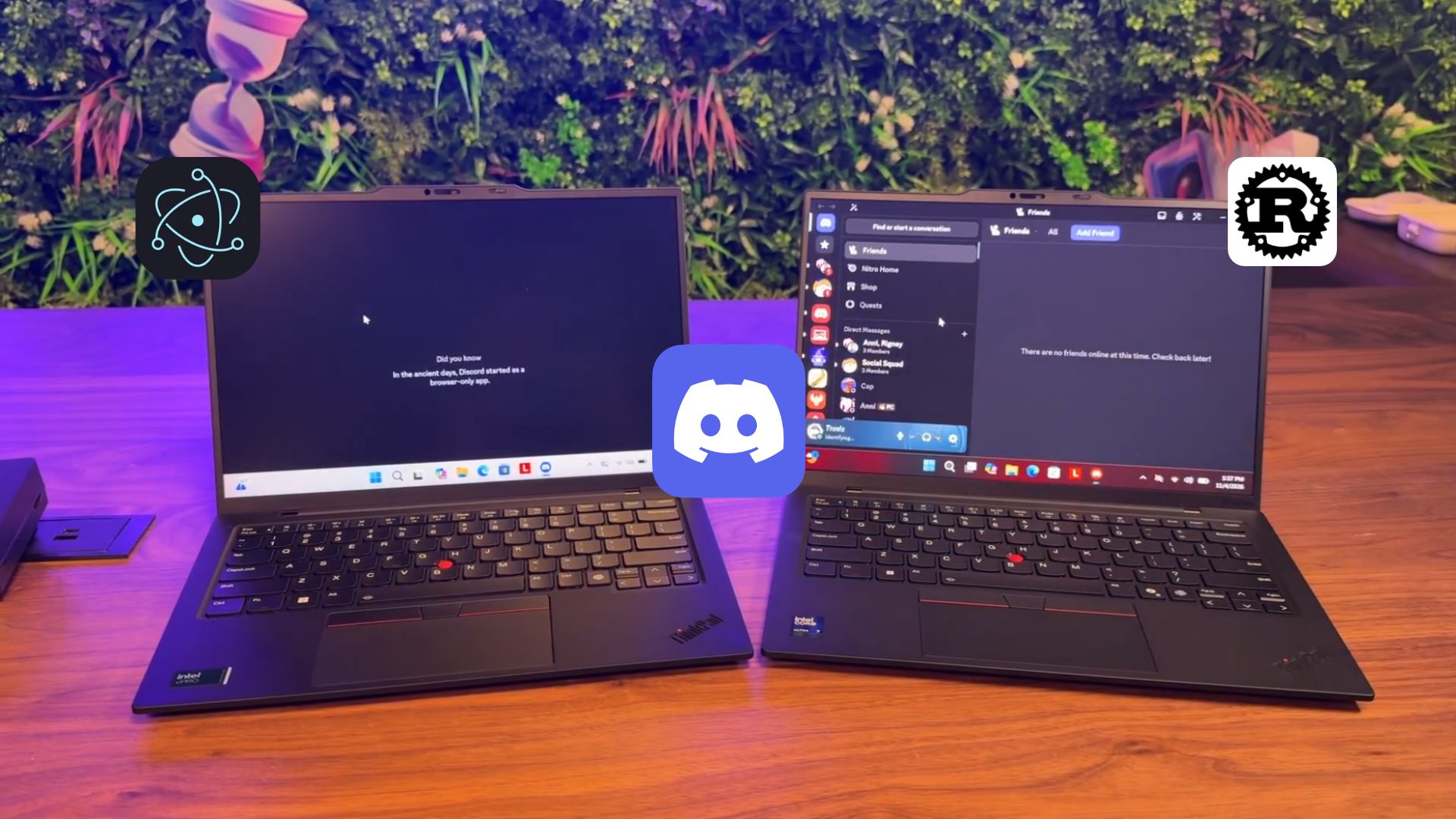
Discord’s current Electron client and its new Rust client launching side by side on two Lenovo ThinkPads running Windows 11
Discord’s new Rust client had its friends list loaded before the current Electron app could get past its loading screen, in a 15-second clip that we found on the X account of Discord co-founder and CTO Stanislav Vishnevskiy. The video had 2.3 million views at the time of writing, and Discord employees have confirmed that both apps were launched from a cold start.
Vishnevskiy also revealed that the 290.2MB RAM usage on the Task Manager of the new client, which shows up as Discord Phoenix, came with two accounts signed in at once, which justifies the already efficient RAM usage.
Discord Rust for Windows 11
Discord’s Rust client opens before the Electron app finishes loading
“The new Discord client using less RAM is just part of the story. Clicking around feels instant, I can’t go back. Check out the boot time,” Vishnevskiy wrote on X, and Discord’s official account also shared the clip with the current client on the left and the Rust rebuild on the right.
We went through the video frame by frame. What’s impressive is that the current client is opened first and shows a blank dark window for about three seconds, followed by a tip that reads “In the ancient days, Discord started as a browser-only app.” Funnily enough, the Electron app still carries a browser engine today.
The new client is double-clicked roughly a second and a half later, yet its window fades in within a second. When the old app reaches its interface, about five seconds after launch, the Rust version already has the friends list loaded, while the Electron client briefly says “There are no friends online at this time.”
Discord Windows app. Credit: Windows Latest
Of course, people on X asked if the new app simply popped out of the system tray. “Both are cold starts, it’s really that fast. We’ve been using it internally now for a while and the first time I tried it I thought I’d forgot to close it when I opened it fresh,” replied Coral, who leads audio and video at Discord.
Travis, who works on socials and community at Discord and filmed the clip, added that a tray launch would mean “the friends list would have already been loaded!” Vishnevskiy thanked him for “finding these janky old laptops,” which are ThinkPads with a Copilot key, so 2024 or newer, which I wouldn’t dare call janky or old. They’re beautiful machines!
The new Discord app skips the “Starting” screen and updates in the background
As you’d already know, the current app usually checks for updates and shows a “Starting” screen when you open it, which one person on X said “takes like 5-10s every time.” Asked why the new client skips it, coral said, “It bootstraps so fast + is a new architecture so we don’t need that modal at all. We auto-update in the background.”
Discord starting animation. Credit: Windows Latest
Discord isn’t handing updates to the Microsoft Store or Windows’ Update Orchestration Platform either, as Coral said “We do not at this moment” when asked.
Discord’s Rust client uses about 70% less RAM with two accounts signed in
When one reply called 290MB “still vile” for a chat app, Vishnevskiy said, “Those 4k avatar decorations gotta render somewhere ;) but joking aside this client is actually running 2 accounts concurrently which is supported in new client.”
Today’s Account Switcher lets you add up to five accounts and swap between them. Asked if the new client could keep work and personal accounts running “without needing to tear down the client in between,” Vishnevskiy replied “Yup.” Again, impressive and exciting.
Discord idle RAM usage. Credit: Windows Latest
For comparison, a Discord employee said in December 2025 that normal usage is under 1GB, while the company tested auto-restarting the app at 4GB. So, 290.2MB is about 70% below the 1GB mark, and on our PCs, the Electron app usually idles at 1-2GB. To be clear, it’s a snapshot from an early build, and Discord hasn’t published a like-for-like benchmark of both clients, but we’ll be doing that test when we get hands-on with the Rust version.
Discord did try to fix Electron from the inside. Its September patch notes say the Electron 42 upgrade cut median CPU usage by about 17%, but “at the cost of a smaller regression to p50 memory usage (~4%).” Even the Game Mode toggle it tested later doesn’t mention RAM.
Discord is replacing Electron with GPUI, not Tauri
Electron inherits its multi-process architecture from Chromium, so every Electron app comes with its own browser engine, with a main process and a renderer process for each window. Tauri, which many guessed Discord would pick, uses Rust for app logic but builds the interface in HTML, CSS and JavaScript inside the system’s webview, which is WebView2 on Windows.
Discord went with GPUI, “A fast, hybrid immediate and retained mode, GPU-accelerated UI framework for Rust” from the makers of the Zed code editor. GPUI draws the interface on the GPU without any HTML, and Rust, which Discord has used since 2018, manages memory without a garbage collector.
| Technology | What it is | Role in Discord |
|---|---|---|
| Rust | Programming language | New client and shared app code |
| GPUI | Rust UI framework from Zed | Draws the new desktop app |
| Electron | Chromium and Node.js runtime | Current desktop app, being removed |
| Tauri | Rust framework using the system webview | Not used |
| React Native | Mobile app framework | Current mobile apps, being removed |
Why not WinUI, you ask? (At least, I thought of it). Discord hasn’t mentioned it, and it was unlikely to, as Microsoft’s native framework only runs on Windows, while GPUI already powers Zed on Windows, macOS and Linux. Discord has its own patches on top of GPUI, and Vishnevskiy said “we will see what we can upstream if relevant to the community.”
Web tech stays where it makes sense, as YouTube embeds and Activities will use the system webview. “We use the native webview similar to Tauri,” Vishnevskiy said about Activities.
Discord’s mobile apps drop React Native, and the web app moves to WebAssembly
Phones keep native interfaces but will share app code with desktop through Rust. On React Native, Vishnevskiy explained, “Since the beginning the iOS app started as React native, Android was ported to React Native couple years ago to achieve parity as it was always lagging in features.”
The browser version will keep rendering HTML, but “logic will be WASM instead of JS.” WebAssembly (WASM) lets code written in languages like Rust run inside a browser, so the web app can share the Rust code too. As for the look, whether you like it or not, “The app looks and works identically to the current one,” Vishnevskiy said.
Discord’s Rust client goes into private testing soon
If you can’t to try it out, Discord marketing director Ryan K. Rigney said, “Going into private testing soon. Gonna take our time to make sure it’s stable and secure first. Won’t be long, tho.” I would rather wait for them to iron out any bugs.
Mark Smith, Discord’s VP of Engineering, added that “accessibility and security are just as important to us as performance,” and Coral confirmed the new client keeps your login token in the system keyring, which is Credential Manager on Windows 10 and 11.
Of course, Discord is not just doing all this work for Windows. When asked if it works on Linux, Rigney replied, “Yes,” and Coral said, “a lot of people run Mac internally!” Discord hasn’t announced a public release date yet.
Discord just made WhatsApp and Teams look worse on Windows 11
Electron made it easier for Discord to ship one desktop app on Windows, macOS, and Linux for a decade. But Discord has now shown that a chat app with millions of users can drop the bundled browser without a redesign.
WhatsApp, Teams and Discord combined using 1.5GB RAM while being idle. Credit: Windows Latest
As for the owners of the biggest messaging platforms for regular users and enterprises, Meta and Microsoft are running out of excuses. WhatsApp went from a native app that idled under 100MB to a WebView2 wrapper using up to 1.2GB, and I uninstalled it. Microsoft Teams also uses WebView2, took up 963MB doing nothing in our tests, and it doesn’t look like Redmond cares enough to go native, despite pushing WinUI.
Ironically, AI got us here. Data centers soaked up DRAM supply, prices shot up, and Windows chief Pavan Davuluri now says “memory is top of mind for us right now in the industry” as Microsoft trims Windows 11’s RAM usage. Apps that kept asking for more RAM are finally going on a diet, and we’ve come full circle.
Are you waiting to try the Rust-based Discord when it rolls out?
Support original journalism.
Windows Latest depends on readers like you. Make us your Preferred source on Google Discover and Google Search, and help our independent reporting reach more people.
Follow us on DiscoverFollow us on Google
WL Newsletter
Get Microsoft news in your inbox!
Stay ahead with the latest Windows, IT, and Microsoft 365 updates. Trusted by 50,000+ subscribers.
Submit
About The Author
Abhijith is a contributing editor for Windows Latest. At Windows Latest, he has written on numerous topics, ranging from Windows to Microsoft Edge. Abhijith holds a degree in Bachelor's of Technology, with a strong focus on Electronics and Communications Engineering. His passion for Windows is evident in his journalism journey, including his articles that decoded complex PowerShell scripts.
RELATED ARTICLESMORE FROM AUTHOR
Windows 11 won’t make you wait for face unlock to fail before typing your PIN, and the fix is already in a new build
Windows 11 users won’t get Windows 12 in 2027, just a new wallpaper instead, as Microsoft retires Bloom
Microsoft swears Windows 11 isn’t “less secure,” even as 1,100+ security fixes landed last month, and warns hackers can now exploit them within hours
Microsoft is betting on native WinUI over web app slop across Windows 11, and even Color Picker and Text Extractor have moved to it...
“Used 5% of the time”: AI already made your RAM pricier, and now OpenAI’s Sam Altman says it’s wasted in your Windows PC
Discord is killing its Electron app that can eat 4GB of RAM on Windows 11, and the Rust rebuild uses just 290MB
Windows 11
Windows 11 won’t make you wait for face unlock to fail before typing your PIN, and the fix is already in a new build
Abhijith M B-November 7, 20260
Windows 11 users won’t get Windows 12 in 2027, just a new wallpaper instead, as Microsoft retires Bloom
November 7, 2026
Microsoft swears Windows 11 isn’t “less secure,” even as 1,100+ security fixes landed last month, and warns hackers can now exploit them within hours
November 6, 2026
Microsoft is betting on native WinUI over web app slop across Windows 11, and even Color Picker and Text Extractor have moved to it...
November 6, 2026
“Used 5% of the time”: AI already made your RAM pricier, and now OpenAI’s Sam Altman says it’s wasted in your Windows PC
November 5, 2026
Windows 10
Hate Windows 11 changes? Windows 10 has 11 months left, and Microsoft is now offering the faster update that barely changes anything
Mayank Parmar-November 3, 20260
Microsoft killed Windows 10 to push Windows 11, but Windows sales crashed 27% as holdouts still refuse to switch
October 29, 2026
Microsoft extended Windows 10, but Nvidia just made the extension meaningless for gamers
September 1, 2026
Microsoft is limiting Microsoft 365 & OneDrive on Windows 10 to push holdouts to Windows 11
August 13, 2026
Windows 10 KB5120249 keeps the OS protected, direct download links for offline installer (.msu)
August 12, 2026
Featured in
ABOUT US
Windows Latest is your premier source for Microsoft news. Discover unbiased, expert coverage on all aspects of Windows and computing. Our news is referred to by CNN, Forbes, CNBC, and more.
FOLLOW US
- About us
- Advertise
- Contact Us
- Copyright
- Terms Of Use
- Privacy Policy
- Select Theme: - [x] System - [x] Light - [x] Dim - [x] Dark
© 2025 Windows Latest | Not associated with Microsoft
来源:Hacker News-首页 · windowslatest.com